# Build a GraphQL API on AWS with CDK, Python, AppSync, and DynamoDB(Part 2)
Hi, Welcome to part 2 of this post series.
In [Part 1](https://phatrabbitapps.com/build-a-graphql-api-on-aws-with-cdk-python-appsync-and-dynamodbpart-1), we installed and created a CDK application alongside all was constructs needed to build this application.
We also went ahead to write some code to initialize and use a couple of constructs.
In this post, we will continue from where we left off in Part 1. Adding Resolvers.
Resolvers are functions that connect fields of the graphQL schema to a data source. In our case, the data source is the DynamoDB we created.
Let's begin
Create Trainer Resolver
Create a folder in the root directory called **resolver_functions**.
Within that folder, create a text file called **create_trainer** and type in the following code
```
{
"version": "2017-02-28",
"operation": "PutItem",
"key": {
"id": { "S": "$util.autoId()" }
},
"attributeValues": {
"firstName": $util.dynamodb.toDynamoDBJson($ctx.args.firstName),
"lastName": $util.dynamodb.toDynamoDBJson($ctx.args.lastName),
"age": $util.dynamodb.toDynamoDBJson($ctx.args.age),
"specialty": $util.dynamodb.toDynamoDBJson($ctx.args.specialty)
}
}
```
This piece of code is a request mapping template that creates a trainer with an auto-generated ID,firstName,lastName, age, and specialty and saves to our DynamoDB table.
Take note of the **operation:PutItem**.
Now, let's attach this template to a resolver function.
In your **cdk_trainer_stack.py**, type in
```
with open(os.path.join(dirname, "../resolver_functions/create_trainer"), 'r') as file:
create_trainer = file.read().replace('\n', '')
create_trainers_resolver = CfnResolver(
self, 'CreateTrainerMutationResolver',
api_id=trainers_graphql_api.attr_api_id,
type_name='Mutation',
field_name='createTrainer',
data_source_name=data_source.name,
request_mapping_template=create_trainer,
response_mapping_template="$util.toJson($ctx.result)"
)
create_trainers_resolver.add_depends_on(api_schema)
```
If you recall, in part 1, we had a **createTrainer** method in our mutation type.
So the **type_name** is Mutation, **field_name** is createTrainer, data_source_name is the name of the DB table, we pass in our template as a string to **request_mapping_template** and return a response(**$util.toJson($ctx.result)**) through a **response_mapping_template**
Update Trainer Resolver
Create a file in the **resolver_functions** directory called update_trainer and type in the following code.
```
{
"version": "2017-02-28",
"operation": "UpdateItem",
"key":{
"id":$util.dynamodb.toDynamoDBJson($ctx.args.id)
},
"update":{
"expression": "SET firstName = :firstName,lastName = :lastName, #ageField =:age,specialty = :specialty",
"expressionNames": {
"#ageField": "age"
},
"expressionValues": {
":firstName": $util.dynamodb.toDynamoDBJson($ctx.args.firstName),
":lastName": $util.dynamodb.toDynamoDBJson($ctx.args.lastName),
":age": $util.dynamodb.toDynamoDBJson($ctx.args.age),
":specialty": $util.dynamodb.toDynamoDBJson($ctx.args.specialty)
}
}
}
```
The above template simply updates trainer information, based on their ID.
Here's how to attach that template to a resolver function
```
with open(os.path.join(dirname, "../resolver_functions/update_trainer"), 'r') as file:
update_trainer = file.read().replace('\n', '')
update_trainers_resolver = CfnResolver(
self,'UpdateMutationResolver',
api_id=trainers_graphql_api.attr_api_id,
type_name="Mutation",
field_name="updateTrainers",
data_source_name=data_source.name,
request_mapping_template=update_trainer,
response_mapping_template="$util.toJson($ctx.result)"
)
update_trainers_resolver.add_depends_on(api_schema)
```
Delete Trainer
Create a delete_trainer text file in **resolver_functions** folder and type in this piece of code.
```
{
"version": "2017-02-28",
"operation": "DeleteItem",
"key": {
"id": $util.dynamodb.toDynamoDBJson($ctx.args.id)
}
}
```
This template deletes a trainer record based on their ID.
Here's it's corresponding resolver function.
```
with open(os.path.join(dirname, "../resolver_functions/delete_trainer"), 'r') as file:
delete_trainer = file.read().replace('\n', '')
delete_trainer_resolver = CfnResolver(
self, 'DeleteMutationResolver',
api_id=trainers_graphql_api.attr_api_id,
type_name='Mutation',
field_name='deleteTrainer',
data_source_name=data_source.name,
request_mapping_template=delete_trainer,
response_mapping_template="$util.toJson($ctx.result)"
)
delete_trainer_resolver.add_depends_on(api_schema)
```
Get All Trainers
Create a text file called **all_trainers** in the **resolver_functions** folder and type in the following code.
```
{
"version": "2017-02-28",
"operation": "Scan",
"limit": $util.defaultIfNull($ctx.args.limit, 20),
"nextToken": $util.toJson($util.defaultIfNullOrEmpty($ctx.args.nextToken, null))
}
```
This template gets all trainers as a paginated list in groups of 20.
```
with open(os.path.join(dirname, "../resolver_functions/all_trainers"), 'r') as file:
all_trainers = file.read().replace('\n', '')
get_all_trainers_resolver = CfnResolver(
self, 'GetAllQueryResolver',
api_id=trainers_graphql_api.attr_api_id,
type_name='Query',
field_name='allTrainers',
data_source_name=data_source.name,
request_mapping_template=all_trainers,
response_mapping_template="$util.toJson($ctx.result)"
)
get_all_trainers_resolver.add_depends_on(api_schema)
```
Get A Single Trainer
Create a text file called **get_trainer** in the **resolver_functions** folder and type in the following code.
```
{
"version": "2017-02-28",
"operation": "GetItem",
"key": {
"id": $util.dynamodb.toDynamoDBJson($ctx.args.id)
}
}
```
We are getting a single trainer based on their ID.
```
with open(os.path.join(dirname, "../resolver_functions/get_trainer"), 'r') as file:
get_trainer = file.read().replace('\n', '')
get_Trainer_resolver = CfnResolver(
self, 'GetOneQueryResolver',
api_id=trainers_graphql_api.attr_api_id,
type_name='Query',
field_name='getTrainer',
data_source_name=data_source.name,
request_mapping_template=get_trainer,
response_mapping_template="$util.toJson($ctx.result)"
)
get_Trainer_resolver.add_depends_on(api_schema)
```
And that's it.
You can grab the complete code from [GitHub](https://github.com/trey-rosius/cdkTrainer)
** Synthesize a template
**
AWS CDK apps are effectively only a definition of your infrastructure using code. When CDK apps are executed, they produce (or “synthesize”, in CDK parlance) an AWS CloudFormation template for each stack defined in your application.
To synthesize a CDK app, use the **cdk synth** command.
Let’s check out the template synthesized from this app.
From the project root directory, activate your virtual environment using
For MacOS/Linux
```
source .venv/bin/activate
```
If you are a Windows platform, you would activate the virtualenv like this:
```
% .venv\Scripts\activate.bat
```
Synthesize your cdk stack using
```
cdk synth
```
Here's my output of the cloud formation template(CdkTrainerStack.template.json), located in the **cdk.out** folder.
```
{
"Resources": {
"trainersApi": {
"Type": "AWS::AppSync::GraphQLApi",
"Properties": {
"AuthenticationType": "API_KEY",
"Name": "trainers-api"
},
"Metadata": {
"aws:cdk:path": "CdkTrainerStack/trainersApi"
}
},
"TrainersApiKey": {
"Type": "AWS::AppSync::ApiKey",
"Properties": {
"ApiId": {
"Fn::GetAtt": [
"trainersApi",
"ApiId"
]
}
},
"Metadata": {
"aws:cdk:path": "CdkTrainerStack/TrainersApiKey"
}
},
"TrainersSchema": {
"Type": "AWS::AppSync::GraphQLSchema",
"Properties": {
"ApiId": {
"Fn::GetAtt": [
"trainersApi",
"ApiId"
]
},
"Definition": "type Trainers { id: ID! firstName:String! lastName:String! age:Int! specialty:Specialty }enum Specialty{ BODYBUILDING, YOUTHFITNESS, SENIORFITNESS, CORRECTIVEEXERCISE} type PaginatedTrainers { items: [Trainers!]! nextToken: String } type Query { allTrainers(limit: Int, nextToken: String): PaginatedTrainers! getTrainer(id: ID!): Trainers } type Mutation { createTrainer( firstName:String!, lastName:String!, age:Int!, specialty:Specialty): Trainers deleteTrainer(id: ID!): Trainers updateTrainers(id: ID!, firstName:String, lastName:String, age:Int, specialty:Specialty):Trainers } type Schema { query: Query mutation: Mutation }"
},
"Metadata": {
"aws:cdk:path": "CdkTrainerStack/TrainersSchema"
}
},
"TrainersTableE85CC9B1": {
"Type": "AWS::DynamoDB::Table",
"Properties": {
"KeySchema": [
{
"AttributeName": "id",
"KeyType": "HASH"
}
],
"AttributeDefinitions": [
{
"AttributeName": "id",
"AttributeType": "S"
}
],
"BillingMode": "PAY_PER_REQUEST",
"StreamSpecification": {
"StreamViewType": "NEW_IMAGE"
},
"TableName": "trainers"
},
"UpdateReplacePolicy": "Delete",
"DeletionPolicy": "Delete",
"Metadata": {
"aws:cdk:path": "CdkTrainerStack/TrainersTable/Resource"
}
},
"TrainersDynamoDBRoleE04DDD5F": {
"Type": "AWS::IAM::Role",
"Properties": {
"AssumeRolePolicyDocument": {
"Statement": [
{
"Action": "sts:AssumeRole",
"Effect": "Allow",
"Principal": {
"Service": "appsync.amazonaws.com"
}
}
],
"Version": "2012-10-17"
},
"ManagedPolicyArns": [
{
"Fn::Join": [
"",
[
"arn:",
{
"Ref": "AWS::Partition"
},
":iam::aws:policy/AmazonDynamoDBFullAccess"
]
]
}
]
},
"Metadata": {
"aws:cdk:path": "CdkTrainerStack/TrainersDynamoDBRole/Resource"
}
},
"TrainersDataSource": {
"Type": "AWS::AppSync::DataSource",
"Properties": {
"ApiId": {
"Fn::GetAtt": [
"trainersApi",
"ApiId"
]
},
"Name": "TrainersDynamoDataSource",
"Type": "AMAZON_DYNAMODB",
"DynamoDBConfig": {
"AwsRegion": "us-east-2",
"TableName": {
"Ref": "TrainersTableE85CC9B1"
}
},
"ServiceRoleArn": {
"Fn::GetAtt": [
"TrainersDynamoDBRoleE04DDD5F",
"Arn"
]
}
},
"Metadata": {
"aws:cdk:path": "CdkTrainerStack/TrainersDataSource"
}
},
"GetOneQueryResolver": {
"Type": "AWS::AppSync::Resolver",
"Properties": {
"ApiId": {
"Fn::GetAtt": [
"trainersApi",
"ApiId"
]
},
"FieldName": "getTrainer",
"TypeName": "Query",
"DataSourceName": "TrainersDynamoDataSource",
"RequestMappingTemplate": "{ \"version\": \"2017-02-28\", \"operation\": \"GetItem\", \"key\": { \"id\": $util.dynamodb.toDynamoDBJson($ctx.args.id) } }",
"ResponseMappingTemplate": "$util.toJson($ctx.result)"
},
"DependsOn": [
"TrainersSchema"
],
"Metadata": {
"aws:cdk:path": "CdkTrainerStack/GetOneQueryResolver"
}
},
"GetAllQueryResolver": {
"Type": "AWS::AppSync::Resolver",
"Properties": {
"ApiId": {
"Fn::GetAtt": [
"trainersApi",
"ApiId"
]
},
"FieldName": "allTrainers",
"TypeName": "Query",
"DataSourceName": "TrainersDynamoDataSource",
"RequestMappingTemplate": "{ \"version\": \"2017-02-28\", \"operation\": \"Scan\", \"limit\": $util.defaultIfNull($ctx.args.limit, 20), \"nextToken\": $util.toJson($util.defaultIfNullOrEmpty($ctx.args.nextToken, null)) }",
"ResponseMappingTemplate": "$util.toJson($ctx.result)"
},
"DependsOn": [
"TrainersSchema"
],
"Metadata": {
"aws:cdk:path": "CdkTrainerStack/GetAllQueryResolver"
}
},
"CreateTrainerMutationResolver": {
"Type": "AWS::AppSync::Resolver",
"Properties": {
"ApiId": {
"Fn::GetAtt": [
"trainersApi",
"ApiId"
]
},
"FieldName": "createTrainer",
"TypeName": "Mutation",
"DataSourceName": "TrainersDynamoDataSource",
"RequestMappingTemplate": " { \"version\": \"2017-02-28\", \"operation\": \"PutItem\", \"key\": { \"id\": { \"S\": \"$util.autoId()\" } }, \"attributeValues\": { \"firstName\": $util.dynamodb.toDynamoDBJson($ctx.args.firstName), \"lastName\": $util.dynamodb.toDynamoDBJson($ctx.args.lastName), \"age\": $util.dynamodb.toDynamoDBJson($ctx.args.age), \"specialty\": $util.dynamodb.toDynamoDBJson($ctx.args.specialty) } }",
"ResponseMappingTemplate": "$util.toJson($ctx.result)"
},
"DependsOn": [
"TrainersSchema"
],
"Metadata": {
"aws:cdk:path": "CdkTrainerStack/CreateTrainerMutationResolver"
}
},
"UpdateMutationResolver": {
"Type": "AWS::AppSync::Resolver",
"Properties": {
"ApiId": {
"Fn::GetAtt": [
"trainersApi",
"ApiId"
]
},
"FieldName": "updateTrainers",
"TypeName": "Mutation",
"DataSourceName": "TrainersDynamoDataSource",
"RequestMappingTemplate": " { \"version\": \"2017-02-28\", \"operation\": \"UpdateItem\", \"key\":{ \"id\":$util.dynamodb.toDynamoDBJson($ctx.args.id) }, \"update\":{ \"expression\": \"SET firstName = :firstName,lastName = :lastName, #ageField =:age,specialty = :specialty\", \"expressionNames\": { \"#ageField\": \"age\" }, \"expressionValues\": { \":firstName\": $util.dynamodb.toDynamoDBJson($ctx.args.firstName), \":lastName\": $util.dynamodb.toDynamoDBJson($ctx.args.lastName), \":age\": $util.dynamodb.toDynamoDBJson($ctx.args.age), \":specialty\": $util.dynamodb.toDynamoDBJson($ctx.args.specialty) } } }",
"ResponseMappingTemplate": "$util.toJson($ctx.result)"
},
"DependsOn": [
"TrainersSchema"
],
"Metadata": {
"aws:cdk:path": "CdkTrainerStack/UpdateMutationResolver"
}
},
"DeleteMutationResolver": {
"Type": "AWS::AppSync::Resolver",
"Properties": {
"ApiId": {
"Fn::GetAtt": [
"trainersApi",
"ApiId"
]
},
"FieldName": "deleteTrainer",
"TypeName": "Mutation",
"DataSourceName": "TrainersDynamoDataSource",
"RequestMappingTemplate": "{ \"version\": \"2017-02-28\", \"operation\": \"DeleteItem\", \"key\": { \"id\": $util.dynamodb.toDynamoDBJson($ctx.args.id) } }",
"ResponseMappingTemplate": "$util.toJson($ctx.result)"
},
"DependsOn": [
"TrainersSchema"
],
"Metadata": {
"aws:cdk:path": "CdkTrainerStack/DeleteMutationResolver"
}
},
"CDKMetadata": {
"Type": "AWS::CDK::Metadata",
"Properties": {
"Analytics": "v2:deflate64:H4sIAAAAAAAAE0WMyw6CMBBFv4V9HUA2LjWYuNCFgj8wlBoq9JG2aJqm/y4PjaszOffOzSHPCsiSPb7thrZ9GqgyDELtkPakYlaNhjJSKmmdGakj5UP+bCTzU0CtrZcUwhSdDOrudjloPhcnnJknf1/TjgmcxREd1t/tdXF4MRNJ6yUK1TYQ7tgMS7gckXAUECq1upkxRnL1rlMyLWAH2+RpOd+YUTouGFQrPwDtGALgAAAA"
},
"Metadata": {
"aws:cdk:path": "CdkTrainerStack/CDKMetadata/Default"
}
}
}
}
```
As you can see, this template includes a bunch of resources
- The trainers API_KEY
- Schema
- Data Source
- All Resolvers
** CDK DEPLOY
**
Now that we've gotten a cloud formation template, it's time to deploy the application.
The first time you deploy an AWS CDK app into an environment (account/region), you’ll need to install a “bootstrap stack”. This stack includes resources that are needed for the toolkit’s operation.
For example, the stack includes an S3 bucket that is used to store templates and assets during the deployment process.
You can use the **cdk bootstrap** command to install the bootstrap stack into an environment
```
cdk bootstrap
```
After successfully installing bootstrap, deploy your app using
```
cdk deploy
```
If you deploy is successful, you should get an output similar to this

**he CloudFormation Console
**
CDK apps are deployed through AWS CloudFormation. Each CDK stack maps 1:1 with CloudFormation stack.
This means that you can use the AWS CloudFormation console in order to manage your stacks.
Let’s take a look at the AWS CloudFormation console.
You will likely see something like this (if you don’t, make sure you are in the correct region):

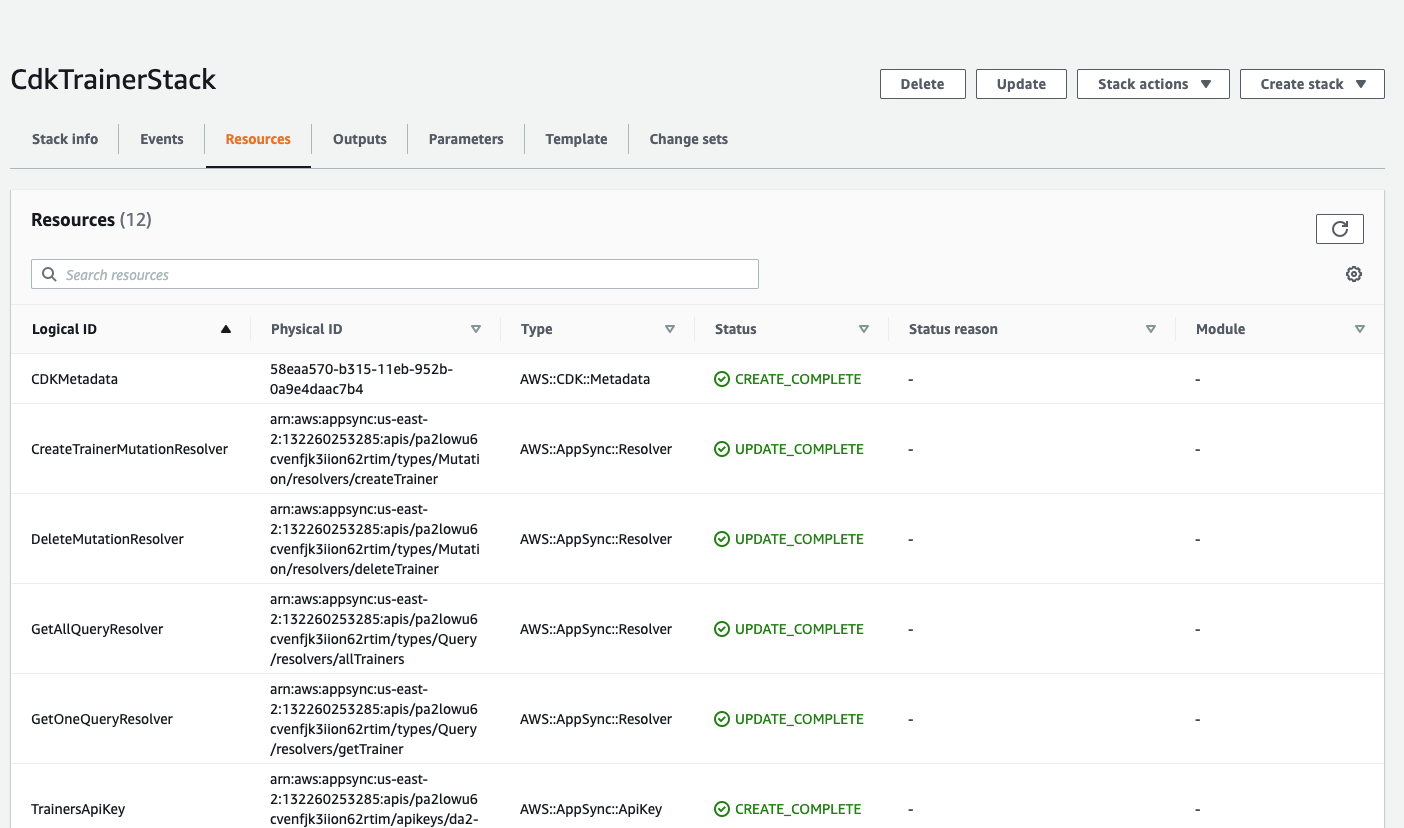
Take note of **CdkTrainerStack** and **CDKToolkit**
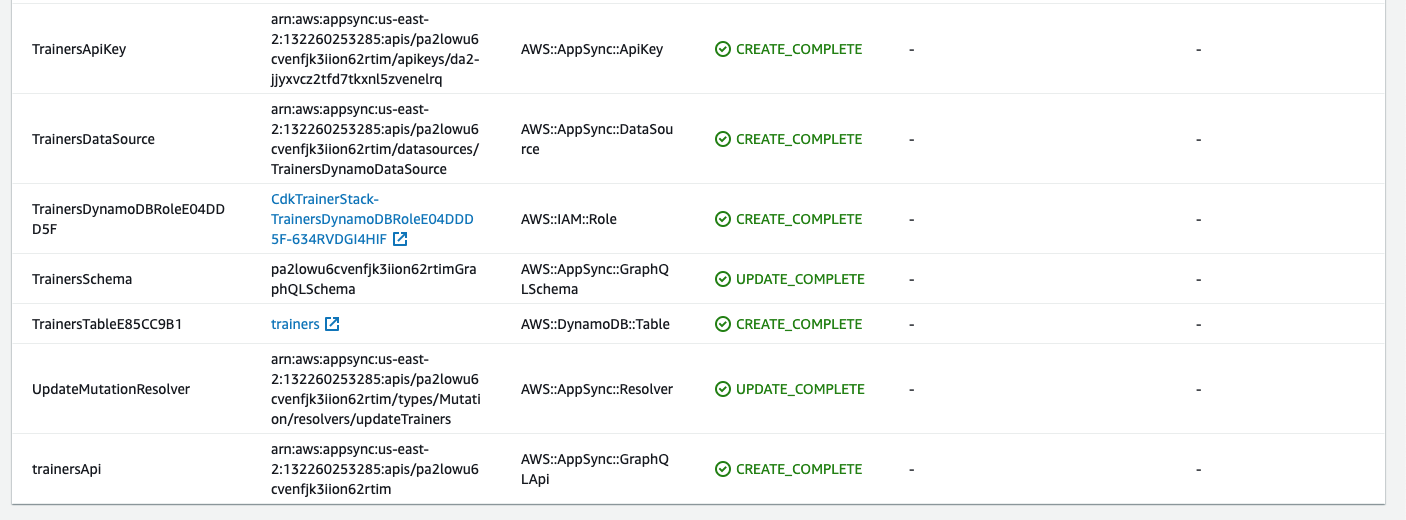
If you select cdkTrainerStack and open the Resources tab, you will see the physical identities of our resources:
** Testing all endpoints
**
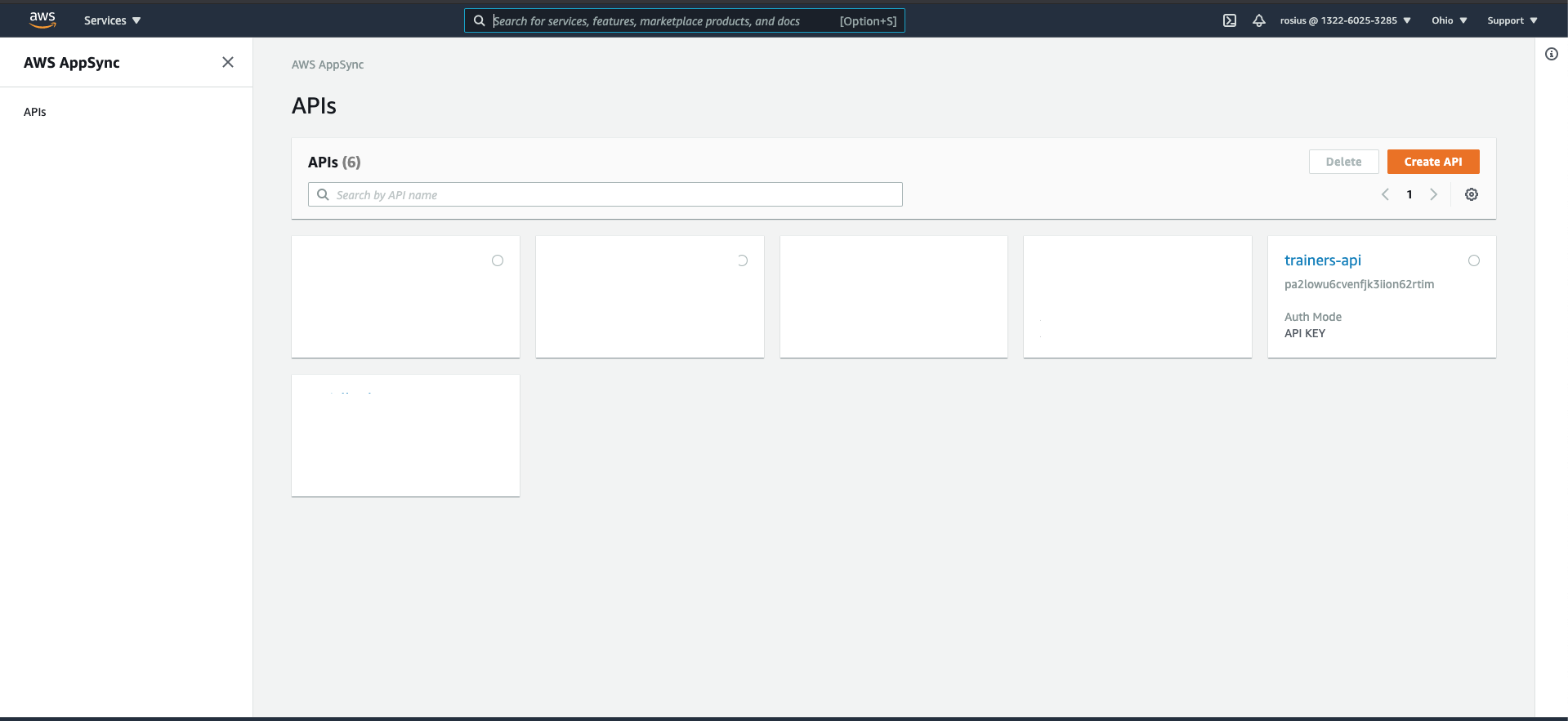
Navigate to AppSync in the AWS console and select the API we just created
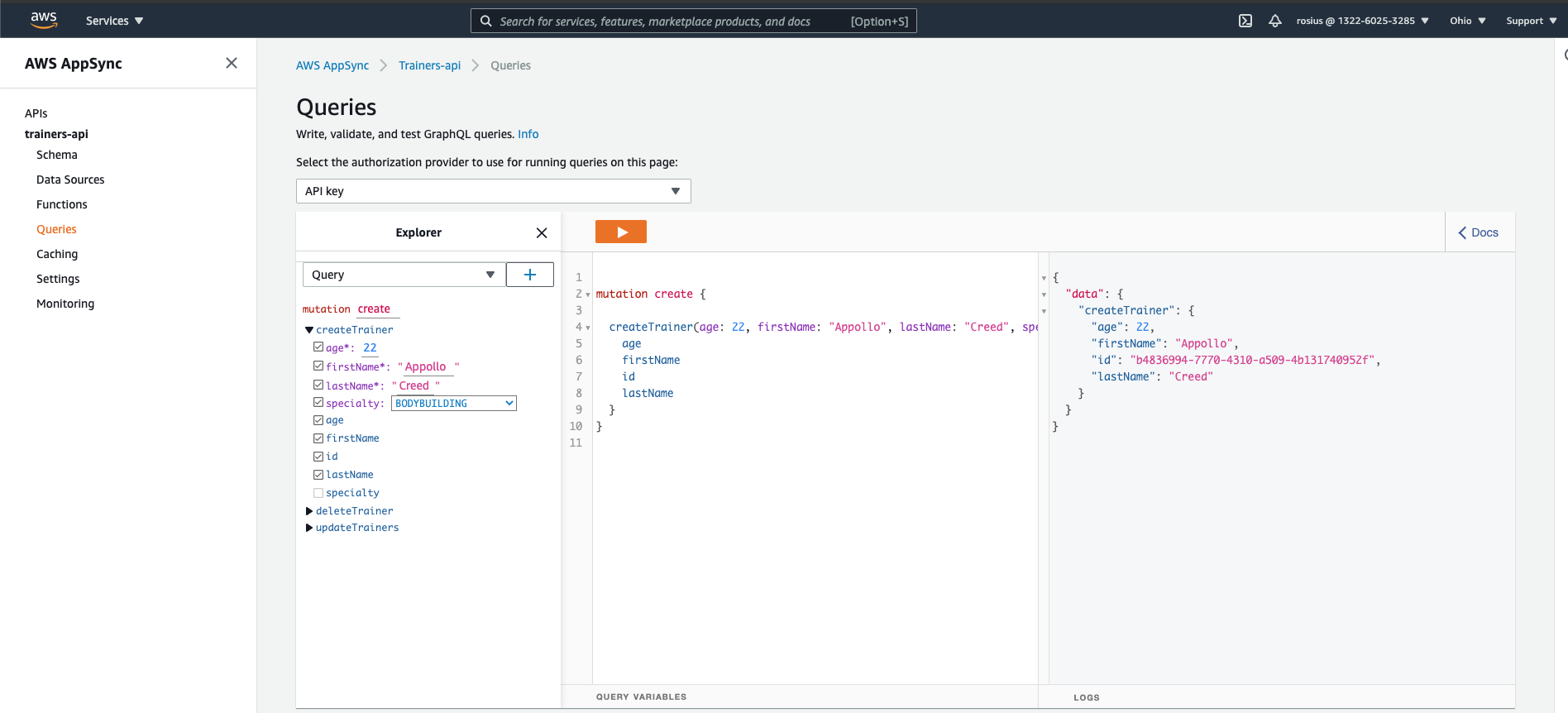
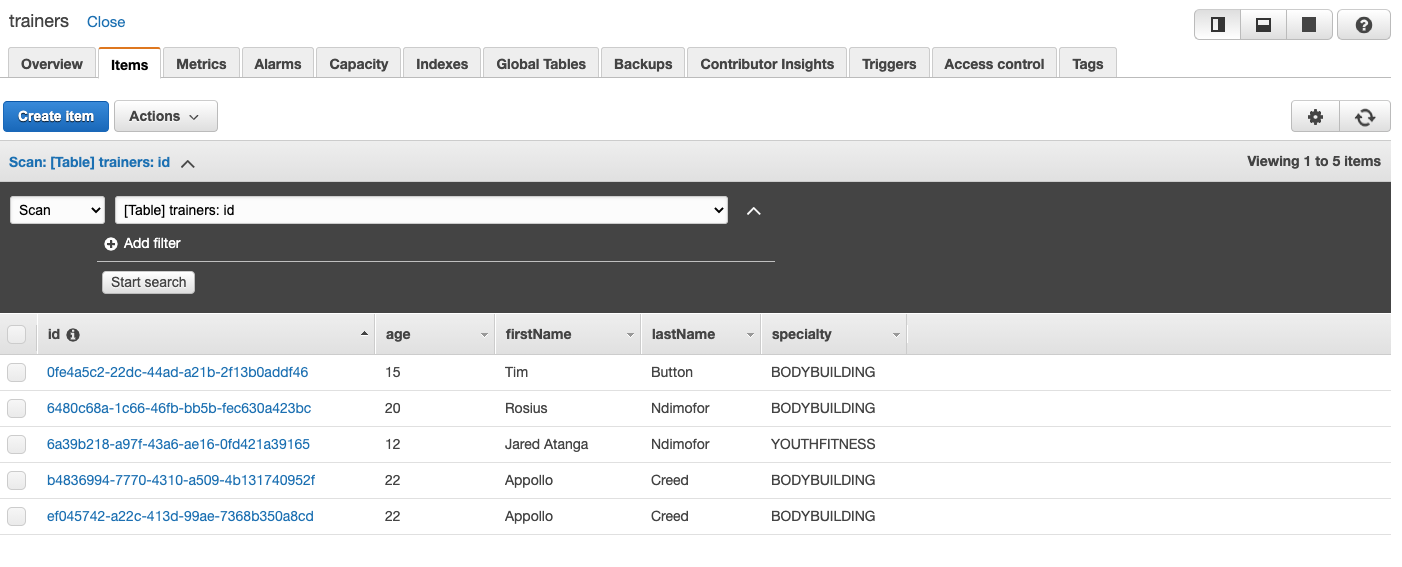
Select query on the left side of the screen and add a couple of users to your DB using the **CreateTrainer** mutation.
Navigate to DynamoDb, click on the trainers table and see all items created.
You can also get all trainers from your DB like so
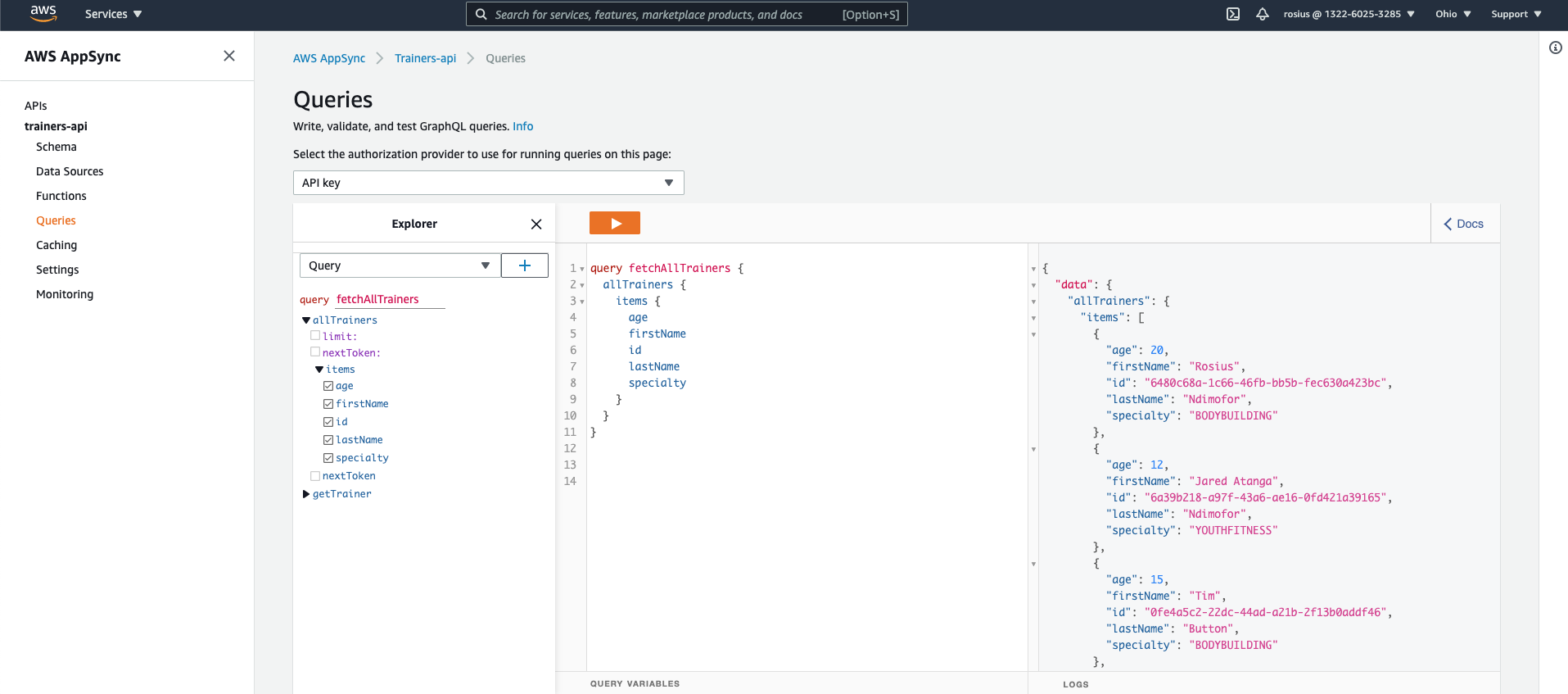
As an exercise, go ahead and test **updateTrainer** , **deleteTrainer**, **GetTrainer**.
** Clean Up Your Stack
**
To avoid unexpected charges to your account, make sure you clean up your CDK stack.
You can either delete the stack through the AWS CloudFormation console or use
```
cdk destroy
```
** Conclusion **
In this post series, we built a GraphQl API using CDK and python, with AWS constructs such as
- AppSync
- DynamoDB
- IAM
Let me know what you think about this piece. I'll also love to know what I should improve on.
Thanks for check this out.
In the next article, we will automate this API by creating a CI/CD pipeline to automatically build and deploy the app when we commit to Github.
So stay tuned.
Till next time my brothers and sisters ✌🏿