# Building Full Stack Serverless Application With Amplify, Flutter, GraphQL, AWS CDK, and Typescript
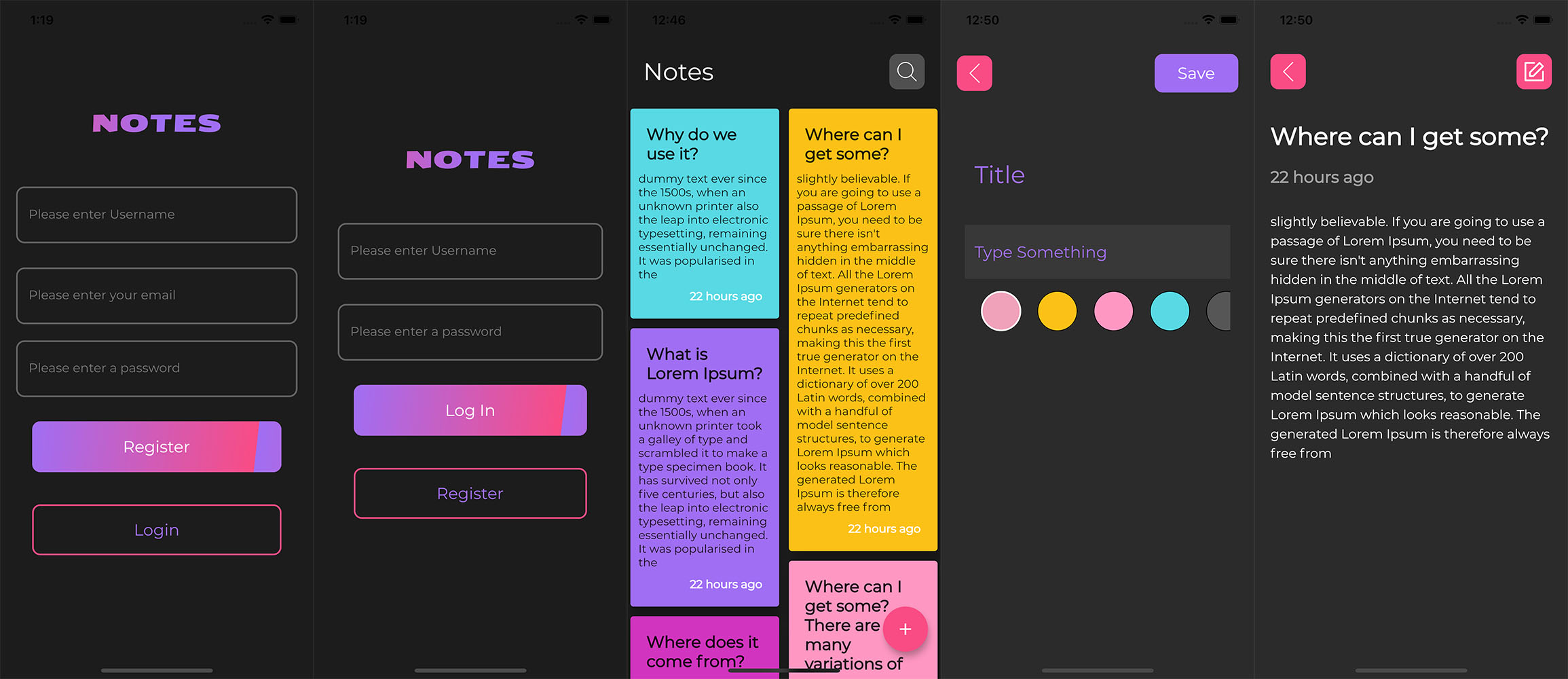
In this tutorial series, you will learn how to build a Full Stack serverless Mobile application using GraphQL, Typescript, AWS CDK(Cloud Development Kit), and Flutter.
Solutions Architecture
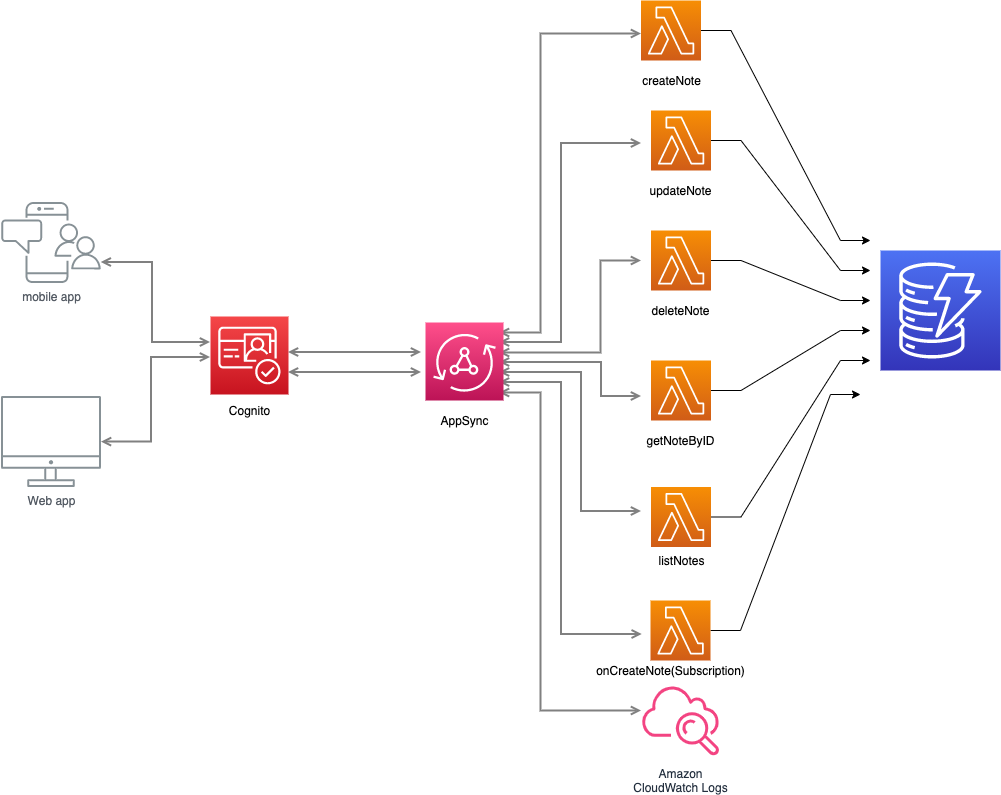
We'll start by building a GraphQL API using Typescript and AWS CDK(Cloud Development Kit) as Infrastructure as Code. The API would allow for both public and private access.
Then, we will build a mobile frontend using Amazon Amplify and Flutter, which would consume the GraphQL API.
In a previous article [Build a GraphQL API on AWS with CDK, Python, AppSync, and DynamoDB](https://phatrabbitapps.com/build-a-graphql-api-on-aws-with-cdk-python-appsync-and-dynamodbpart-1) we looked at creating a GraphQL API with python and AWS CDK. We used Apache VTL templates as our resolvers.
In this series, we will be using lambda functions as resolvers. I personally prefer using direct lambda functions as resolvers and I'll tell you why in a moment.
If you are new to GraphQL and AppSync in general, you might start asking yourself questions like?
- What is GraphQL?
- What are resolvers?
- What are VTL templates?
- Why did you prefer using direct lambda functions to VTL templates as resolvers?
Lots of Why's......
It's quite a long series, So let's get started.
Basic Overview of Some Concepts
What is GraphQL ?
GraphQL is aggressively becoming the new kid on the block when it comes to querying data from a data source. Partly due to its ability to let clients query only the data they need at that moment and in the format that they need it.
> GraphQL is a query language that gives a client(app) the flexibility to request specific data in a declarative manner and in the exact format they need it, from a server.
The QL in Graph stands for Query Language.
GraphQL has three top-level operations:
- ***Query*** - read-only fetch
- ***Mutation*** - write, followed by a fetch
- ***Subscription*** - long-lived connection for receiving data.
These operations are exposed via a schema that defines the capabilities of an API.
A schema is composed of 2 types
- root type (Query, Mutation, Subscriptions)
- user-defined type. (Note)
The first step in creating a GraphQL API is creating a schema.
Here’s an example schema that has both root types and a user-defined type.
```
type Note {
id:ID!
title:String!
description:String!
}
type Query {
getNoteById(id:ID!):Note
listAllNotes:[Note]
.......
......
}
type Mutation {
createNote(id:ID!,title:String!,description:String!):Note
.....
....
}
type Subscription {
onCreateNote:Note @aws-subscribe(mutations:["createNote"])
.......
.........
}
```
** Note** is a user-defined type with 3 fields.**(id,title,description).**
The ***ID, String*** at the end of each field is known as a scalar type. There are other scalar types such as ***Int, Float, Bool***, and a lot more.
The ! At the end of a scalar type marks it as non-nullable. It must always have a value.
**Query** is a root type and it defines the endpoints that our application would use to query(retrieve) data from datasources. From the code above, we have ***getNoteById*** and ***listAllNotes***
```
getNoteById(id:ID!):Note
```
The above endpoint, retrieves a single **Note** object by passing the Note item's id. **:Note** specifies the object which should be returned.
```
listAllNotes:[Note]
```
Retrieve a list of all Notes from the data source. **:[Note] ** signifies a return type of **Note** in a list format.
***Mutations*** contain endpoints responsible for write operations,that are followed by a fetch.
For example,
```
createNote(id:ID!,title:String!,description:String!):Note
```
The Above endpoint creates a new Note by passing in the id, title, and description, and then returns a ***Note*** object on success.
The Mutation type can also contain updateNote,deleteNote, etc as we'll see later.
***Subscriptions*** in AWS AppSync are invoked as a response to a mutation and are used to create long-lived connections for receiving data.
In the above subscription, we create a connection to receive new Notes whenever they are created.
```
onCreateNote:Note @aws-subscribe(mutations:["createNote"])
```
***@aws-subscribe*** is a directive that is used to decorate the subscription endpoint, giving it subscription capabilities.
What are resolvers ?
We just defined the types above. User types and root types. Resolvers simply connect the fields of those types to a data source. There are multiple data sources you can connect to. A NoSQL database like DynamoDB, A relational database like Amazon Aurora, a lambda function an elastic search engine, etc.
I urge you to learn more about GraphQL
- https://graphql.org/
- [GraphQl Overview](https://docs.aws.amazon.com/appsync/latest/devguide/graphql-overview.html)
What are VTL Templates
Also known as Apache Velocity Template Language, is a logical template language that gives you the power to manipulate both the request and the response in the standard request/response flow of a web application, using techniques such as
- Default values for new items
- Input validation and formatting
- Transforming and shaping data
- Iterating over lists, maps, and arrays to pluck out or alter values
- Filter/change responses based on user identity
- Complex authorization checks
AWS AppSync uses VTL to translate GraphQL requests from clients into a request to your data source. Then it reverses the process to translate the data source response back into a GraphQL response.
Why did you prefer using direct lambda functions to VTL templates as resolvers?
- Easier to write and maintain
- More powerful for marshaling and validating requests and responses
- Common functionality can be more DRY than possible with VTLs (macros are not supported)
- More flexible debugging and logging
- Easier to test
- Better tooling and linting are available
That was a brief overview of some of the concepts we would be using in this series.
Let's get started developing the API in the next article coming up soon
Happy Coding ✌🏿