Pipeline Resolvers With CDK v2, Typescript and GraphQL

INTRODUCTION
Executing functions in sequence is the main logic behind pipeline resolvers
AWS AppSync is a fully managed service that allows developers deploy Serverless GraphQL backends in the AWS cloud. It provides features that developers can use to create modern data driven applications allowing them to easily query multiple databases, microservices, and APIs from a single GraphQL endpoint.
Customers can leverage
- AppSync real-time capabilities,
- offline data synchronization,
- built-in server-side caching,
- fine-grained access control,
- security,
- support for business logic in the API layer using GraphQL resolvers, and more.
In this article, we focus on how to implement and orchestrate backend logic directly in the AppSync GraphQL API layer using pipeline resolvers and AWS CDK as infrastructure as Code.
Resolvers are built-in functions in GraphQL that “resolve” types or fields defined in the GraphQL schema with the data in the data sources.
Resolvers in AppSync can be of two types:
- unit resolvers Or
- pipeline resolvers.
Pipeline resolvers offer the ability to serially execute operations against multiple data sources in a single API call, triggered by queries, mutations, or subscriptions.
A pipeline resolver is composed of a
- before mapping template.
- a string of functions each composed of a request/response mapping template pointing to a Datasource.
- an after mapping template.
As a pipeline resolver delegates execution to a list of functions, it is therefore not linked to any data source.
In the before mapping template , some preparation logic is made before executing the defined functions.
When the list of functions is being evaluated in sequence, the pipeline resolver request mapping template evaluated result is made available to the first function as $ctx.prev.result.
Each function output is available to the next function as $ctx.prev.result.
The after mapping template allows you to perform some final mapping logic from the output of the last function to the expected Graphql field type.
The output of the last function in the functions list is available in the pipeline resolver mapping template as $ctx.prev.result or $ctx.result.
Prerequisite
- AWS User Account
- AWS CDK CLI
- Node
- Some GraphQL Knowledge
- Some VTL Knowledge
The Problem
Let's assume we are building a social media application.One of the use cases of our app is
- User A should only be able to view User B's posts if User B hasn't blocked User A.
So if I've blocked you, you shouldn't be able to see my posts.
Let's begin
Create a new project folder and give it a name. I'll call mine CDKPipelineResolvers
mkdir CDKPipelineResolvers
cd CDKPipelineResolvers
Within your project folder, Create a new CDK typescript project.
cdk init app --language typescript
Open the project in your favourite terminal and create a folder called schema in the projects root directory. This folder's going to contain the graphql schema for our app.
Create a schema.graphql file inside the schema folder and type this in.
schema {
  query: Query
  mutation: Mutation
}

type Mutation {
  createPost(input: CreatePostInput!): Post!
  blockUser(id: ID!, target: ID!): Boolean!
}

type Query {
  getPostsByCreator(id: ID!): [Post!]!
}

type Post {
  id: ID!
  creatorId: ID!
  post: String!
}

input CreatePostInput {
  creatorId: ID!
  post: String!
}
We have 2 Mutations
- createPost
- blockUser
And 1 Query
- getPostsByCreator
DynamoDB Tables
Our application is going to have 2 DynamoDB tablesPostsDynamoDBTableto save users posts, with a Global secondary index calledcreator-indexto help us retrieveusers postsbyuserId.
    const postsDynamoDBTable: Table = new Table(this, "PostsDynamoDBTable", {
      tableName: "PostsDynamoDBTable",

      partitionKey: {
        name: "id",
        type: AttributeType.STRING,
      },

      billingMode: BillingMode.PAY_PER_REQUEST,
      stream: StreamViewType.NEW_IMAGE,

      removalPolicy: RemovalPolicy.DESTROY,
    });
    postsDynamoDBTable.addGlobalSecondaryIndex({
      indexName: "creator-index",
      partitionKey: {
        name: "creatorId",
        type: AttributeType.STRING,
      },

      projectionType: ProjectionType.ALL,
    });
BlockedUsersDynamoDBTableto save blocked users. With auserIdas the partition key andblockedUserIdas sort key.
    const blockedUsersDynamoDBTable: Table = new Table(
      this,
      "BlockedUsersDynamoDBTable",
      {
        tableName: "BlockedUsersDynamoDBTable",

        partitionKey: {
          name: "userId",
          type: AttributeType.STRING,
        },
        sortKey: {
          name: "blockedUserId",
          type: AttributeType.STRING,
        },

        billingMode: BillingMode.PAY_PER_REQUEST,
        stream: StreamViewType.NEW_IMAGE,

        removalPolicy: RemovalPolicy.DESTROY,
      }
    );
DataSources
Both dynamoDb tables would serve asdatasources. And here's how to achieve that with cdk
    const postsTableDatasource: CfnDataSource = new CfnDataSource(
      this,
      "MyPostsDynamoDBTableDataSource",
      {
        apiId: graphAPI.attrApiId,
        name: "PostsDynamoDBTableDataSource",
        type: "AMAZON_DYNAMODB",
        dynamoDbConfig: {
          tableName: postsDynamoDBTable.tableName,
          awsRegion: this.region,
        },
        serviceRoleArn: dynamoDBRole.roleArn,
      }
    );

    const blockedUsersTableDatasource: CfnDataSource = new CfnDataSource(
      this,
      "MyBlockedUsersDynamoDBTableDataSource",
      {
        apiId: graphAPI.attrApiId,
        name: "BlockedUsersDynamoDBTableDataSource",
        type: "AMAZON_DYNAMODB",
        dynamoDbConfig: {
          tableName: blockedUsersDynamoDBTable.tableName,
          awsRegion: this.region,
        },
        serviceRoleArn: dynamoDBRole.roleArn,
      }
    );
Take note of the dynamoDb serviceRoleArn which we create like so
    const dynamoDBRole = new Role(this, "DynamoDBRole", {
      assumedBy: new ServicePrincipal("appsync.amazonaws.com"),
    });

    dynamoDBRole.addManagedPolicy(
      ManagedPolicy.fromAwsManagedPolicyName("AmazonDynamoDBFullAccess")
    );
VTL Templates
Inside thelib folder, create a folder called vtl_templates which would contain the vtl templates for our app.
Create Post Request
This VTL template helps us create and save a user's posts in the posts dynamodb table.
Create a file called create_post_request.vtl' insidevtl_templates` folder and type in the following code.
Mutation.createPost
##create_post_request.vtl

#set($id = $util.autoId())

{
    "version" : "2018-05-29",

    "operation" : "PutItem",

    "key" : {
        "id" : $util.dynamodb.toDynamoDBJson($id),
        "creatorId": $util.dynamodb.toDynamoDBJson($ctx.args.input.creatorId)
    },

    "attributeValues" : $util.dynamodb.toMapValuesJson($ctx.args.input)
}
Create another file called create_post_response.vtl' inside ofvtl_templates` folder and type in the response.
##create_post_response.vtl

#if($ctx.error)
    $util.error($ctx.error.message, $ctx.error.type)
#end
$util.toJson($ctx.result)
Now let's attach this resolver template to the postsTableDatasource and schema.graphql
    const createPostResolver = new CfnResolver(this, "CreatePostResolver", {
      apiId: graphAPI.attrApiId,
      typeName: "Mutation",
      fieldName: "createPost",

      dataSourceName: postsTableDatasource.name,
      requestMappingTemplate: readFileSync(
        "./lib/vtl_templates/create_post_request.vtl"
      ).toString(),
      responseMappingTemplate: readFileSync(
        "./lib/vtl_templates/create_post_response.vtl"
      ).toString(),
    });

createPostResolver.addDependsOn(apiSchema);
Mutation.blockUser
Let's create requests and response templates for blocking users.
Again, inside of vtl_templates folder, create a file called block_user_request.vtl and type in the following code
##block_user_request.vtl

#set($blocked = { "userId" : "$ctx.args.id", "blockedUserId": "$ctx.args.target" })


{
    "version" : "2018-05-29",
    "operation" : "PutItem",

     "key" : {
        "userId" : $util.dynamodb.toDynamoDBJson($ctx.args.id),
        "blockedUserId": $util.dynamodb.toDynamoDBJson($ctx.args.target)
    },

    "attributeValues" : $util.dynamodb.toMapValuesJson($blocked )

}
When UserA blocks UserB , both their ID's are taken and saved into the BlockedUsersDynamoDBTable.
Make sure that the exact name of the dynamoDB table is present in the vtl template as shown above.
Create the response file called block_user_response.vtl
##block_user_response.vtl

#if($ctx.error)
    $util.error($ctx.error.message, $ctx.error.type)
#end
true
Attach blockedUsersTableDatasource Datasource
    const blockUserResolver: CfnResolver = new CfnResolver(
      this,
      "BlockUserResolver",
      {
        apiId: graphAPI.attrApiId,
        typeName: "Mutation",
        fieldName: "blockUser",
        dataSourceName: blockedUsersTableDatasource.name,

        requestMappingTemplate: readFileSync(
          "./lib/vtl_templates/block_user_request.vtl"
        ).toString(),
        responseMappingTemplate: readFileSync(
          "./lib/vtl_templates/block_user_response.vtl"
        ).toString(),
      }
    );

blockUserResolver.addDependsOn(apiSchema);
Query.getPostsByCreator
Now that you have posts and blockedUsers, we need to provide the ability for users to view the posts of users when they haven't been blocked. To satisfy this requirement, we need to first check that the requester hasn't been blocked by the posts creator, and finally query for the posts.
Because this functionality requires two data source operations, we're going to create two functions. The first function, isUserBlockedFunction, checks whether the requester has been blocked by the post creator. The second function, getPostsByCreatorFunction, retrieves the requested posts given a creator ID.
Let’s look at the execution flow below for the proposed resolver on the Query.getPostsByCreator field:
Before mapping template: Prepare the context and field input arguments.
isUserBlockedFunction: Checks whether the requester is the post creator. If not, it checks whether the post creator has blocked the requester by doing a DynamoDB GetItem operation on the blocked user's table.
getPostsByCreatorFunction: Retrieves posts from the Posts table using a DynamoDB Query operation on the creator-index Global Secondary Index.
After mapping template: Maps posts result so DynamoDB attributes map correctly to the expected GraphQL type fields.
- Create a vtl file called
before_mapping_template.vtland type in the following code
#set($result = { "creatorId": $ctx.args.id, "callerId": $ctx.identity.username })
$util.toJson($result)
- Create vtl file called
is_user_blocked_request.vtlwhich checks if requesting user has been blocked
#set($creatorId= $ctx.prev.result.creatorId)
#set($callerId= $ctx.prev.result.callerId)

## if the creatorId is the callerId, no need to make the check
#if($creatorId == $callerId)
    #return($ctx.prev.result)
#end

{
    "version" : "2018-05-29",

    "operation" : "GetItem",

    "key" : {
        "userId" : $util.dynamodb.toDynamoDBJson($creatorId),
        "blockedUserId" : $util.dynamodb.toDynamoDBJson($callerId)
    }
}
is_user_blocked_response.vtl
#if($ctx.error)
    $util.error("Unable to retrieve blocked status: ${ctx.error.message}", $ctx.error.type)
#end

## if the caller has been blocked
#if($ctx.result)
    $util.unauthorized()
#end

$util.toJson($ctx.prev.result)
Remember that data is being passed from one function to another in a pipeline resolver through $ctx.prev.result.
- Attach a datasource to the
is_user_blockedfunction.
    const isUserBlockedFunction: CfnFunctionConfiguration =
      new CfnFunctionConfiguration(this, "isUserBlockedFunction", {
        apiId: graphAPI.attrApiId,

        dataSourceName: blockedUsersTableDatasource.name,
        requestMappingTemplate: readFileSync(
          "./lib/vtl_templates/is_user_blocked_request.vtl"
        ).toString(),
        responseMappingTemplate: readFileSync(
          "./lib/vtl_templates/is_user_blocked_response.vtl"
        ).toString(),
        functionVersion: "2018-05-29",
        name: "isUserBlockedFunction",
      });
- Create a vtl file called
get_posts_by_creator_request.vtl
{
    "version" : "2018-05-29",

    "operation" : "Query",

    "query" : {
        "expression": "#creatorId = :creatorId",
        "expressionNames": {
            "#creatorId" : "creatorId"
        },
        "expressionValues" : {
            ":creatorId" : $util.dynamodb.toDynamoDBJson($ctx.prev.result.creatorId)
        }
    },

    "index": "creator-index"
}
- Create a vtl file called
get_posts_by_creator_response.vtl
#if($ctx.error)
    $util.error($ctx.error.message, $ctx.error.type)
#end

$util.toJson($ctx.result)
- Attach a Datasource
    const getPostsByCreatorFunction: CfnFunctionConfiguration =
      new CfnFunctionConfiguration(this, "getPostsByCreatorFunction", {
        apiId: graphAPI.attrApiId,
        dataSourceName: postsTableDatasource.name,
        requestMappingTemplate: readFileSync(
          "./lib/vtl_templates/get_posts_by_creator_request.vtl"
        ).toString(),

        responseMappingTemplate: readFileSync(
          "./lib/vtl_templates/get_posts_by_creator_response.vtl"
        ).toString(),

        functionVersion: "2018-05-29",
        name: "getPostsByCreatorFunction",
      });
- Create a vtl file called
after_mapping_template.vtl
$util.toJson($ctx.result.items)
Now that we've. created both functions and attached datasources to them, lets create the getPostsByCreatorResolver, which is a none datasource PIPELINE resolver and add the functions to it.
    const getPostsByCreatorResolver: CfnResolver = new CfnResolver(
      this,
      "getPostsByCreatorResolver",
      {
        apiId: graphAPI.attrApiId,
        typeName: "Query",
        fieldName: "getPostsByCreator",
        kind: "PIPELINE",
        pipelineConfig: {
          functions: [
            isUserBlockedFunction.attrFunctionId,
            getPostsByCreatorFunction.attrFunctionId,
          ],
        },

        requestMappingTemplate: readFileSync(
          "./lib/vtl_templates/before_mapping_template.vtl"
        ).toString(),

        responseMappingTemplate: readFileSync(
          "./lib/vtl_templates/after_mapping_template.vtl"
        ).toString(),
      }
    );


 getPostsByCreatorResolver.addDependsOn(apiSchema);
Take note of the kind and pipelineConfig parameters. Also, notice that the request and mapping templates are before and after mapping templates we created above and this resolver has no datasource.
Now, we'll require users to be authenticated before accessing our app.
Therefore we need to create a userpool and a userpoolclient and attach the client to our appsync application.
    const userPool = new cognito.UserPool(this, "PipelineResolverUserPool", {
      selfSignUpEnabled: true,
      accountRecovery: cognito.AccountRecovery.PHONE_AND_EMAIL,
      userVerification: {
        emailStyle: cognito.VerificationEmailStyle.CODE,
      },
      autoVerify: {
        email: true,
      },
      standardAttributes: {
        email: {
          required: true,
          mutable: true,
        },
      },
    });

    const userPoolClient = new cognito.UserPoolClient(this, "UserPoolClient", {
      userPool,
    });
   const graphAPI = new CfnGraphQLApi(this, "graphqlApi", {
      name: "sample-pipeline",
      authenticationType: "AMAZON_COGNITO_USER_POOLS",

      userPoolConfig: {
        userPoolId: userPool.userPoolId,
        defaultAction: "ALLOW",
        awsRegion: "us-east-2",
      },

      logConfig: {
        fieldLogLevel: "ALL",
        cloudWatchLogsRoleArn: cloudWatchRole.roleArn,
      },
      xrayEnabled: true,
    });
Please Grab the complete code on GITHUB.
Here's the complete code for the stack.
import {
  CfnMapping,
  CfnOutput,
  RemovalPolicy,
  Stack,
  StackProps,
} from "aws-cdk-lib";
import { Construct } from "constructs";
import * as cognito from "aws-cdk-lib/aws-cognito";

import {
  CfnGraphQLApi,
  CfnGraphQLSchema,
  CfnDataSource,
  CfnResolver,
  CfnFunctionConfiguration,
} from "aws-cdk-lib/aws-appsync";
import { ManagedPolicy, Role, ServicePrincipal } from "aws-cdk-lib/aws-iam";
import {
  Table,
  AttributeType,
  BillingMode,
  StreamViewType,
  ProjectionType,
} from "aws-cdk-lib/aws-dynamodb";
import { readFileSync } from "fs";
// import * as sqs from 'aws-cdk-lib/aws-sqs';

export class CdkPipelineResolversStack extends Stack {
  constructor(scope: Construct, id: string, props?: StackProps) {
    super(scope, id, props);

    // The code that defines your stack goes here

    const userPool = new cognito.UserPool(this, "PipelineResolverUserPool", {
      selfSignUpEnabled: true,
      accountRecovery: cognito.AccountRecovery.PHONE_AND_EMAIL,
      userVerification: {
        emailStyle: cognito.VerificationEmailStyle.CODE,
      },
      autoVerify: {
        email: true,
      },
      standardAttributes: {
        email: {
          required: true,
          mutable: true,
        },
      },
    });

    const userPoolClient = new cognito.UserPoolClient(this, "UserPoolClient", {
      userPool,
    });

      const dynamoDBRole = new Role(this, "DynamoDBRole", {
        assumedBy: new ServicePrincipal("appsync.amazonaws.com"),
      });

      dynamoDBRole.addManagedPolicy(
        ManagedPolicy.fromAwsManagedPolicyName("AmazonDynamoDBFullAccess")
      );

    // give appsync permission to log to cloudwatch by assigning a role

    const cloudWatchRole = new Role(this, "appSyncCloudWatchLogs", {
      assumedBy: new ServicePrincipal("appsync.amazonaws.com"),
    });

    cloudWatchRole.addManagedPolicy(
      ManagedPolicy.fromAwsManagedPolicyName(
        "service-role/AWSAppSyncPushToCloudWatchLogs"
      )
    );

    const graphAPI = new CfnGraphQLApi(this, "graphqlApi", {
      name: "sample-pipeline",
      authenticationType: "AMAZON_COGNITO_USER_POOLS",

      userPoolConfig: {
        userPoolId: userPool.userPoolId,
        defaultAction: "ALLOW",
        awsRegion: "us-east-2",
      },

      logConfig: {
        fieldLogLevel: "ALL",
        cloudWatchLogsRoleArn: cloudWatchRole.roleArn,
      },
      xrayEnabled: true,
    });

    const blockedUsersDynamoDBTable: Table = new Table(
      this,
      "BlockedUsersDynamoDBTable",
      {
        tableName: "BlockedUsersDynamoDBTable",

        partitionKey: {
          name: "userId",
          type: AttributeType.STRING,
        },
        sortKey: {
          name: "blockedUserId",
          type: AttributeType.STRING,
        },

        billingMode: BillingMode.PAY_PER_REQUEST,
        stream: StreamViewType.NEW_IMAGE,

        removalPolicy: RemovalPolicy.DESTROY,
      }
    );

    const postsDynamoDBTable: Table = new Table(this, "PostsDynamoDBTable", {
      tableName: "PostsDynamoDBTable",

      partitionKey: {
        name: "id",
        type: AttributeType.STRING,
      },

      billingMode: BillingMode.PAY_PER_REQUEST,
      stream: StreamViewType.NEW_IMAGE,

      removalPolicy: RemovalPolicy.DESTROY,
    });
    postsDynamoDBTable.addGlobalSecondaryIndex({
      indexName: "creator-index",
      partitionKey: {
        name: "creatorId",
        type: AttributeType.STRING,
      },

      projectionType: ProjectionType.ALL,
    });

    const postsTableDatasource: CfnDataSource = new CfnDataSource(
      this,
      "MyPostsDynamoDBTableDataSource",
      {
        apiId: graphAPI.attrApiId,
        name: "PostsDynamoDBTableDataSource",
        type: "AMAZON_DYNAMODB",
        dynamoDbConfig: {
          tableName: postsDynamoDBTable.tableName,
          awsRegion: this.region,
        },
        serviceRoleArn: dynamoDBRole.roleArn,
      }
    );

    const blockedUsersTableDatasource: CfnDataSource = new CfnDataSource(
      this,
      "MyBlockedUsersDynamoDBTableDataSource",
      {
        apiId: graphAPI.attrApiId,
        name: "BlockedUsersDynamoDBTableDataSource",
        type: "AMAZON_DYNAMODB",
        dynamoDbConfig: {
          tableName: blockedUsersDynamoDBTable.tableName,
          awsRegion: this.region,
        },
        serviceRoleArn: dynamoDBRole.roleArn,
      }
    );

    const apiSchema = new CfnGraphQLSchema(this, "GraphqlApiSchema", {
      apiId: graphAPI.attrApiId,
      definition: readFileSync("./schema/schema.graphql").toString(),
    });

    const createPostResolver = new CfnResolver(this, "CreatePostResolver", {
      apiId: graphAPI.attrApiId,
      typeName: "Mutation",
      fieldName: "createPost",

      dataSourceName: postsTableDatasource.name,
      requestMappingTemplate: readFileSync(
        "./lib/vtl_templates/create_post_request.vtl"
      ).toString(),
      responseMappingTemplate: readFileSync(
        "./lib/vtl_templates/create_post_response.vtl"
      ).toString(),
    });

    const blockUserResolver: CfnResolver = new CfnResolver(
      this,
      "BlockUserResolver",
      {
        apiId: graphAPI.attrApiId,
        typeName: "Mutation",
        fieldName: "blockUser",
        dataSourceName: blockedUsersTableDatasource.name,

        requestMappingTemplate: readFileSync(
          "./lib/vtl_templates/block_user_request.vtl"
        ).toString(),
        responseMappingTemplate: readFileSync(
          "./lib/vtl_templates/block_user_response.vtl"
        ).toString(),
      }
    );

    const isUserBlockedFunction: CfnFunctionConfiguration =
      new CfnFunctionConfiguration(this, "isUserBlockedFunction", {
        apiId: graphAPI.attrApiId,

        dataSourceName: blockedUsersTableDatasource.name,
        requestMappingTemplate: readFileSync(
          "./lib/vtl_templates/is_user_blocked_request.vtl"
        ).toString(),
        responseMappingTemplate: readFileSync(
          "./lib/vtl_templates/is_user_blocked_response.vtl"
        ).toString(),
        functionVersion: "2018-05-29",
        name: "isUserBlockedFunction",
      });

    const getPostsByCreatorFunction: CfnFunctionConfiguration =
      new CfnFunctionConfiguration(this, "getPostsByCreatorFunction", {
        apiId: graphAPI.attrApiId,
        dataSourceName: postsTableDatasource.name,
        requestMappingTemplate: readFileSync(
          "./lib/vtl_templates/get_posts_by_creator_request.vtl"
        ).toString(),

        responseMappingTemplate: readFileSync(
          "./lib/vtl_templates/get_posts_by_creator_response.vtl"
        ).toString(),

        functionVersion: "2018-05-29",
        name: "getPostsByCreatorFunction",
      });

    const getPostsByCreatorResolver: CfnResolver = new CfnResolver(
      this,
      "getPostsByCreatorResolver",
      {
        apiId: graphAPI.attrApiId,
        typeName: "Query",
        fieldName: "getPostsByCreator",
        kind: "PIPELINE",
        pipelineConfig: {
          functions: [
            isUserBlockedFunction.attrFunctionId,
            getPostsByCreatorFunction.attrFunctionId,
          ],
        },

        requestMappingTemplate: readFileSync(
          "./lib/vtl_templates/before_mapping_template.vtl"
        ).toString(),

        responseMappingTemplate: readFileSync(
          "./lib/vtl_templates/after_mapping_template.vtl"
        ).toString(),
      }
    );

    createPostResolver.addDependsOn(apiSchema);
    blockUserResolver.addDependsOn(apiSchema);
    getPostsByCreatorResolver.addDependsOn(apiSchema);

    new CfnOutput(this, "UserPoolId", {
      value: userPool.userPoolId,
    });

    new CfnOutput(this, "appsync id", {
      value: graphAPI.attrApiId,
    });
    new CfnOutput(this, "appsync Url", {
      value: graphAPI.attrGraphQlUrl,
    });

    new CfnOutput(this, "UserPoolClientId", {
      value: userPoolClient.userPoolClientId,
    });
  }
}
Compile and deploy your cdk-app to the cloud using
cdk bootstrap

cdk deploy
Testing
Create Cognito Users
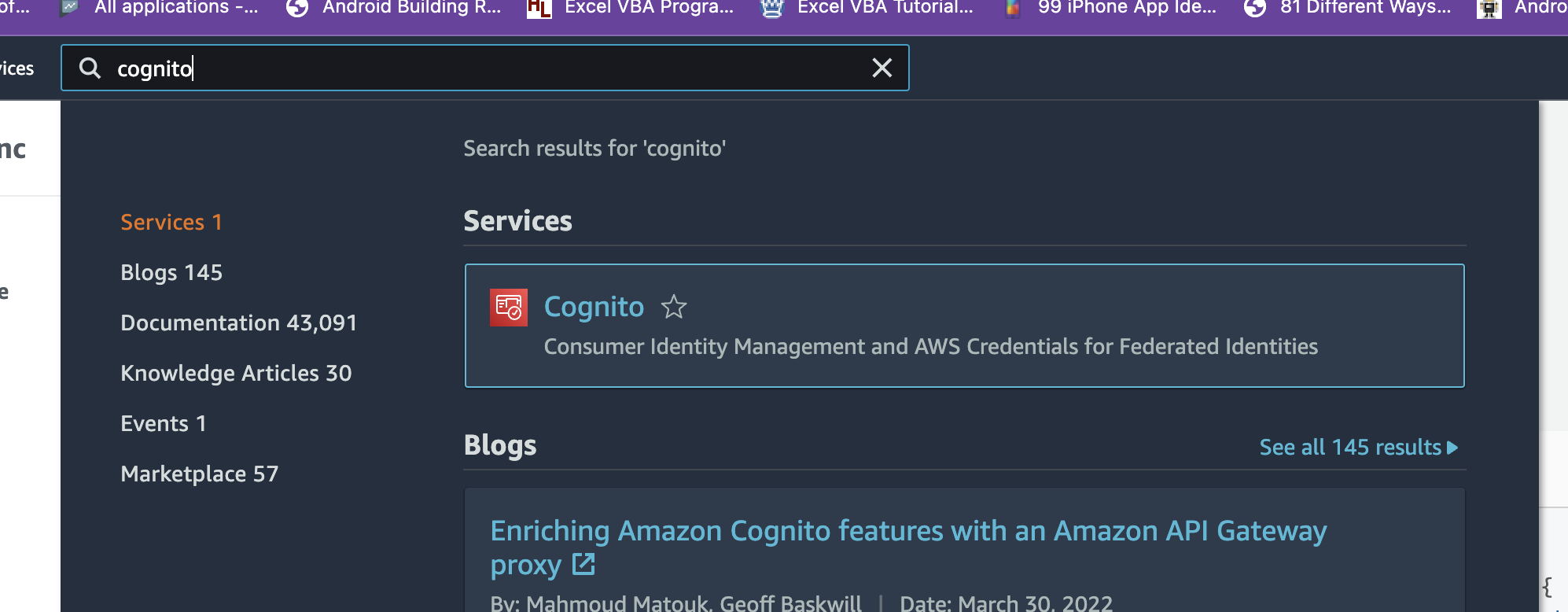
First step in testing is to create 2 Cognito users.Open up your
aws console, type cognitor in the search bar and hit enter.
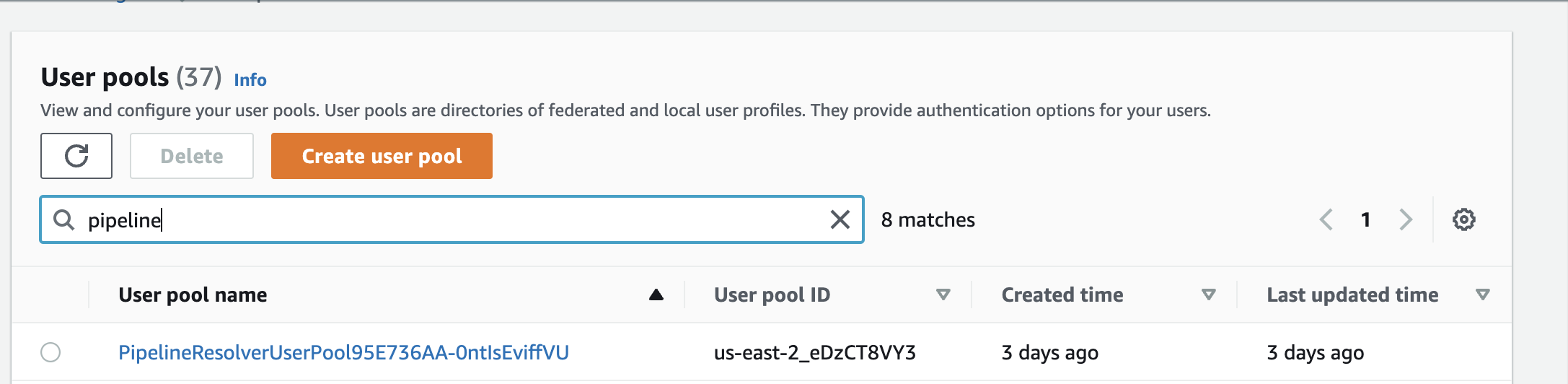
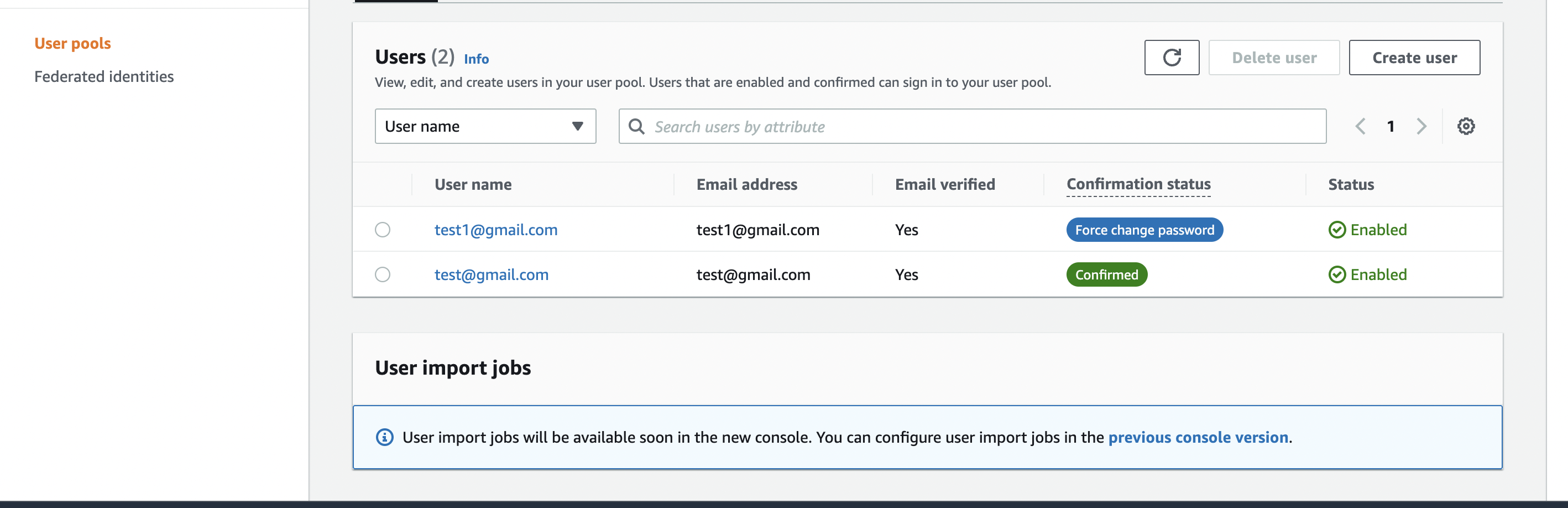
Choose your userpool from the list of userpools in the users menu and create 2 users.
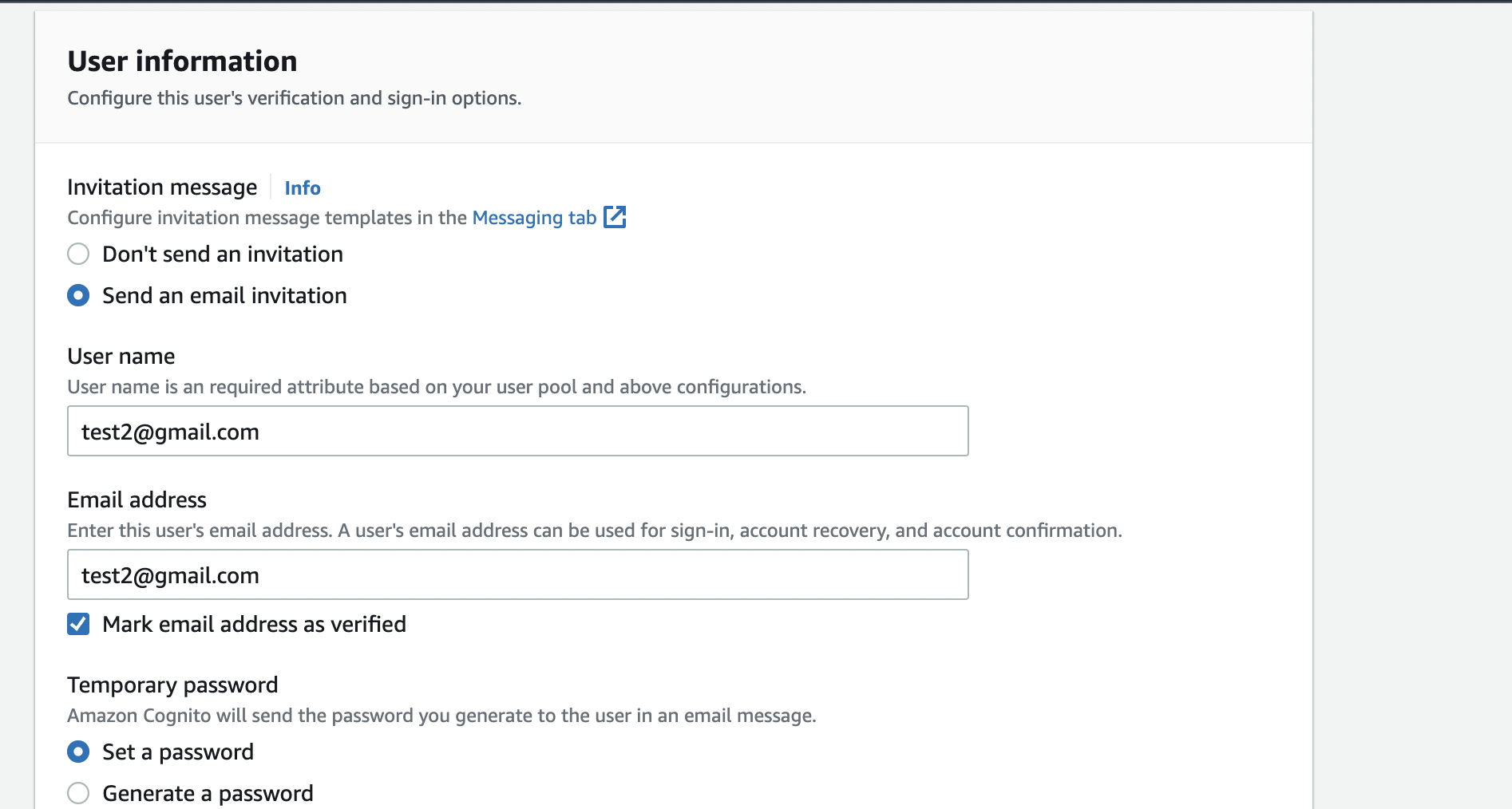 Add and verify their emails by checking the
 Mark email address as verified checkbox.
Appsync
After creating both users, we have to move toappsync to test our api.
Again from the search bar, type in
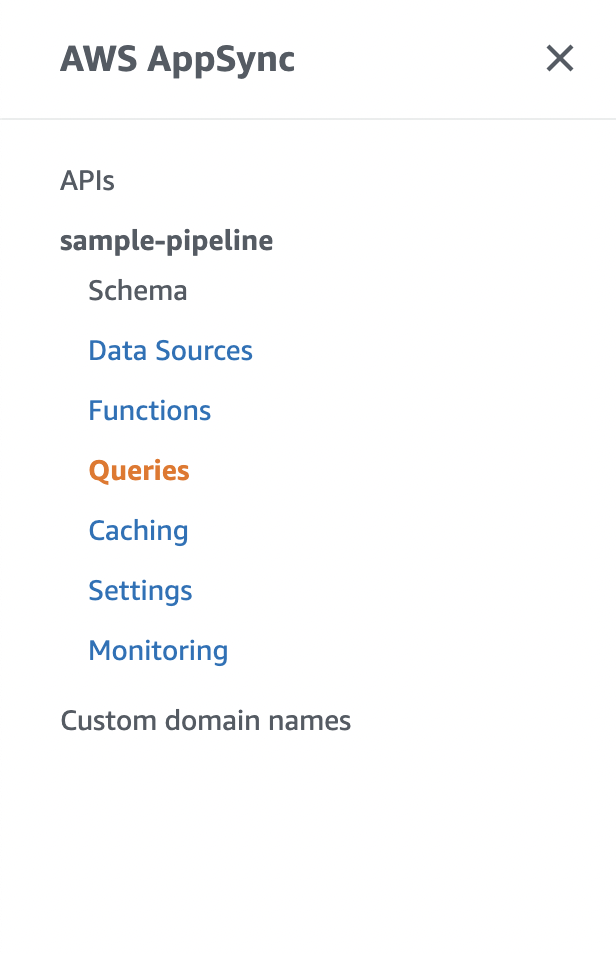
appsync and hit enter. In the appsync window, open up your appsync project and clickqueries` in the left menu.
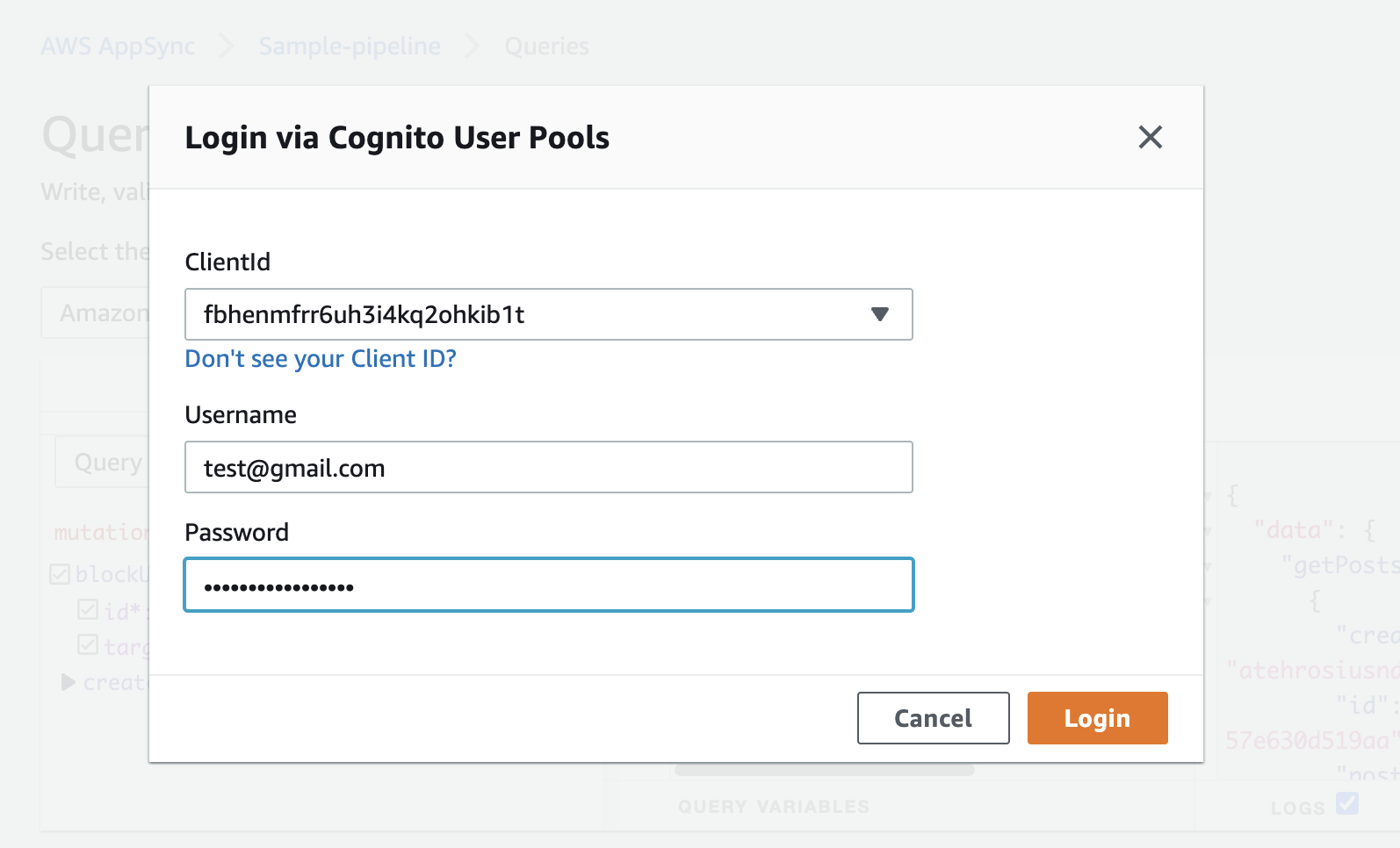
Sign into appsync with one of the accounts you creator above.
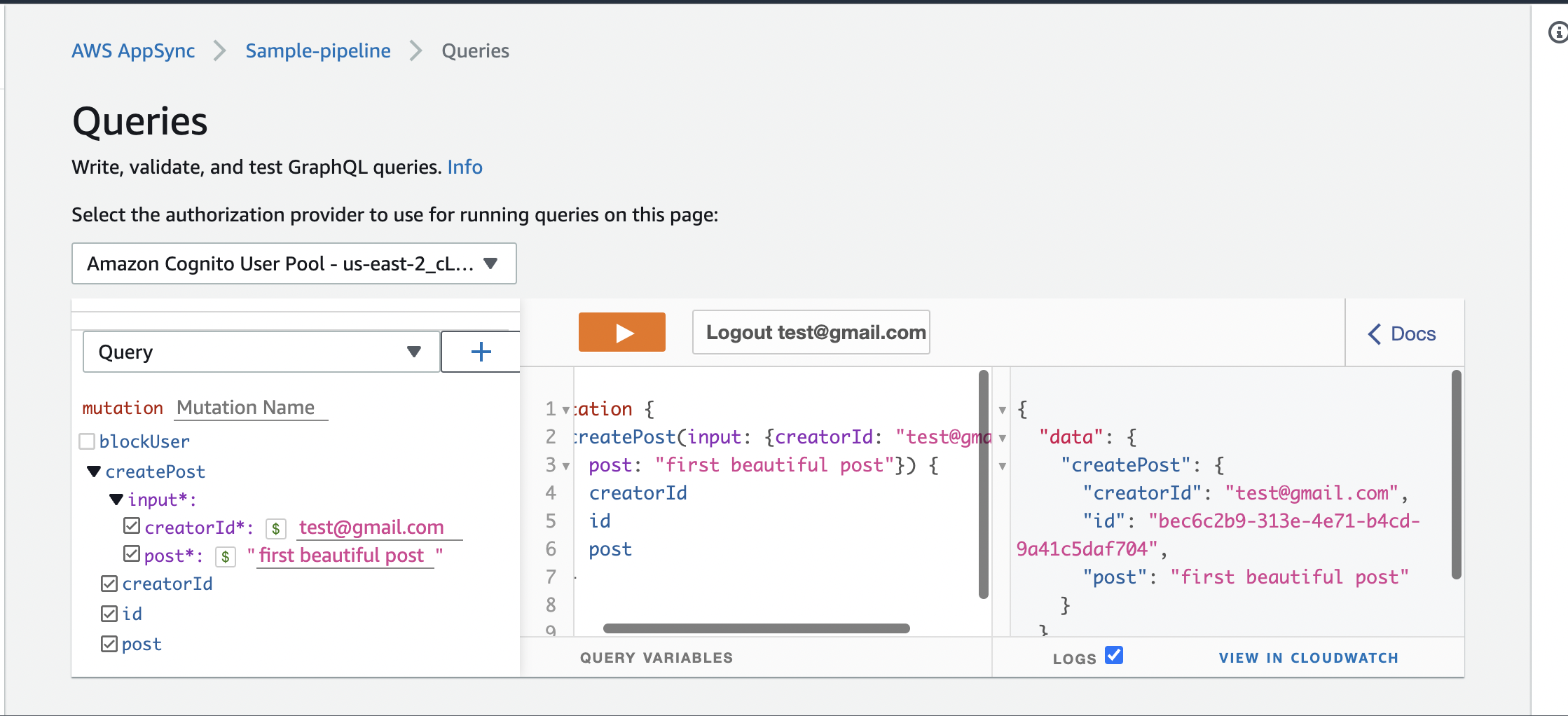
Create Post Create multiple posts using the Mutation.createPost endpoint
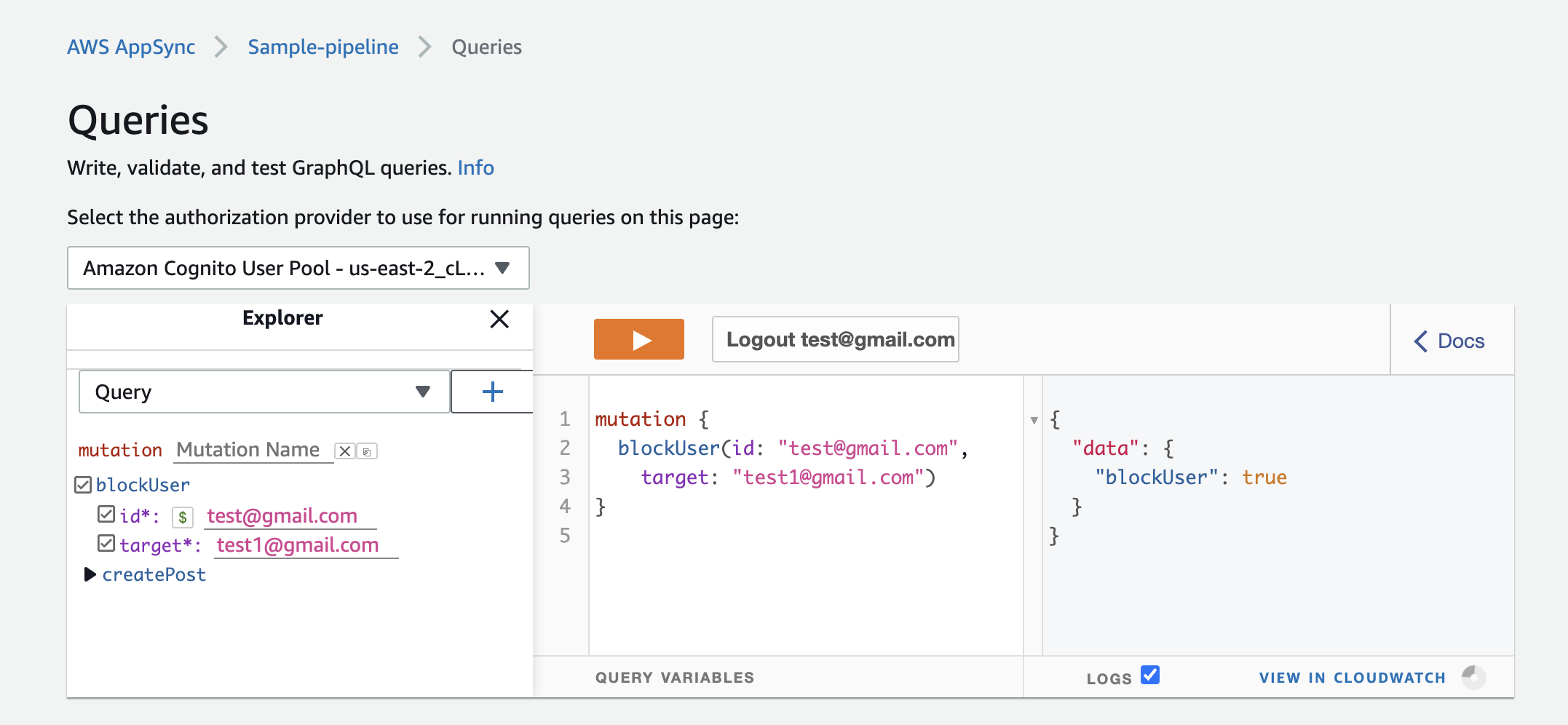
Block User Block user 2 from seeing your posts
Get Posts By Creator Sign in with user 2 and try getting user1's posts.
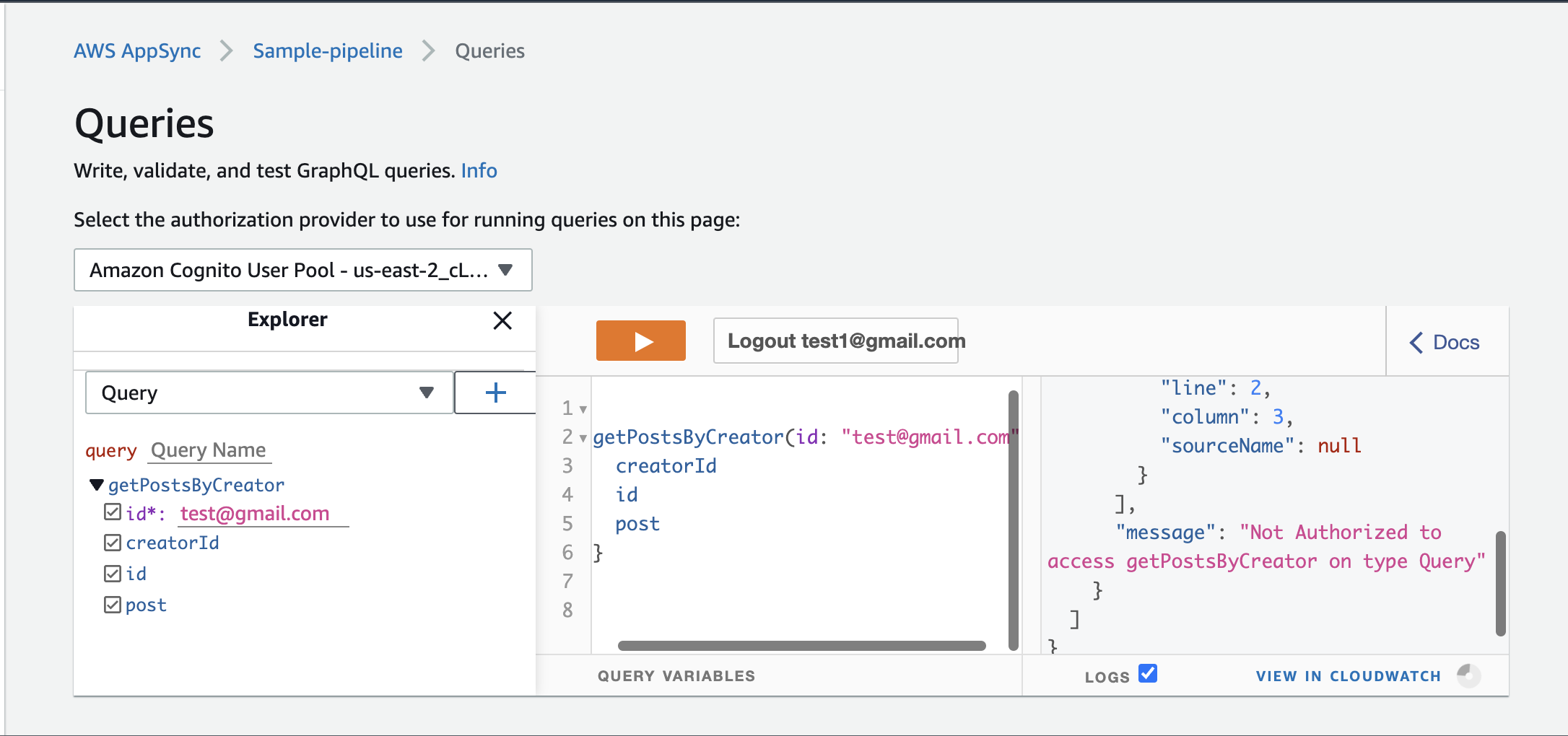
You'll get hit with an unAuthorized message, because you were blocked by user1. Try creating another user account(test2@gmail.com) and accessing user1's posts from that account.
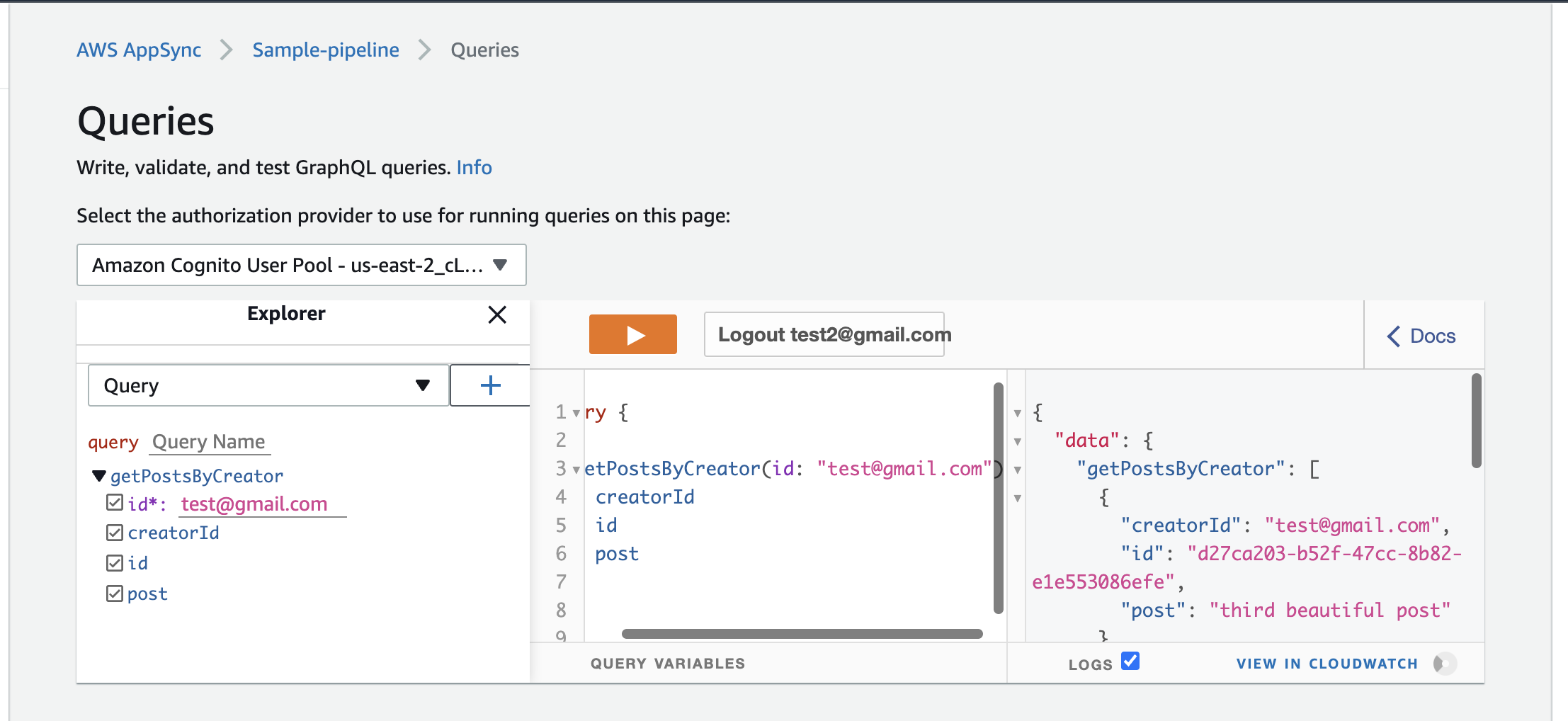
It succeeds. Because user3 hasn't been blocked by user1.
Conclusion
In this blog post, we saw how we could use AppSync Pipeline Resolvers to carryout functions that access different datasources and output to single GraphQl endpoint.
We also looked at creating a complete graphql api using typescript and cdk version 2
References
https://docs.aws.amazon.com/appsync/latest/devguide/tutorial-pipeline-resolvers.html#aws-appsync-tutorial-pipeline-resolvers
https://aws.amazon.com/blogs/mobile/appsync-pipeline-resolvers-1/
https://aws.amazon.com/blogs/mobile/appsync-pipeline-resolvers-2/
https://aws.amazon.com/blogs/mobile/appsync-pipeline-resolvers-3/
About the author
I love creating and writing about the creation of software.
Comments
Join the discussionNo comments yet. Be the first to comment.


