Building a Step Functions Workflow With CDK, AppSync, and Python
Hello, how are you doing today?
In the first part of this series, we built a step functions workflow for a simple apartment booking scenario using the AWS Step functions low code visual editor.
Here's the link to the article
Building Apps with step functions
In this post, we’ll look at how to build the same workflow using CDK and python.
Prerequisite
- Install AWS CLI (https://docs.aws.amazon.com/cli/latest/userguide/cli-chap-welcome.html)
- Install AWS CDK CLI(https://docs.aws.amazon.com/cdk/v2/guide/home.html)
- AWS Account
- Any IDE of your choice. I use PyCharm
- Install Python 3.8
Assumption
I’ll assume you’ve created and deployed at least a Todo GraphQL API before. If not, here are great articles to help you level up:
https://docs.aws.amazon.com/appsync/latest/devguide/designing-your-schema.html
https://phatrabbitapps.com/build-a-graphql-api-on-aws-with-cdk-python-appsync-and-dynamodbpart-1
Problem Statement
What are we trying to solve?
So while building out a bigger system(Apartment Complex Management System), I came across an interesting problem.
I’ll assume that most of us have reserved or booked either an apartment or hotel or flight online.
For this scenario, let’s go with apartments. So when you reserve an apartment, here’s a breakdown in the simplest form of the series of steps that occur after that:
- The apartment is marked as reserved, probably with a status change. Let’s say the apartment status changes from vacant to reserved.
- This apartment is made unavailable for reservation by others for a particular period of time.
- The client is required to make payment within that period of time.
- If payment isn’t made within that time, the reservation is canceled, and the apartment status changes back from reserved to vacant.
- If payment is made, then the apartment status changes from reserved to occupied/paid.
Building out this business logic using custom code is very possible but inefficient.
Why?
Because as developers, good ones for that matter, we always have to be on the lookout for tools that’ll help us carry out tasks in an efficient and scalable manner.
The series of steps outlined above serves as a good use case for AWS step functions.
- The sequence of a service interaction is important
- The state has to be managed with AWS service calls
- Decision trees, retries, and error-handling logic are required
Solutions Architecture
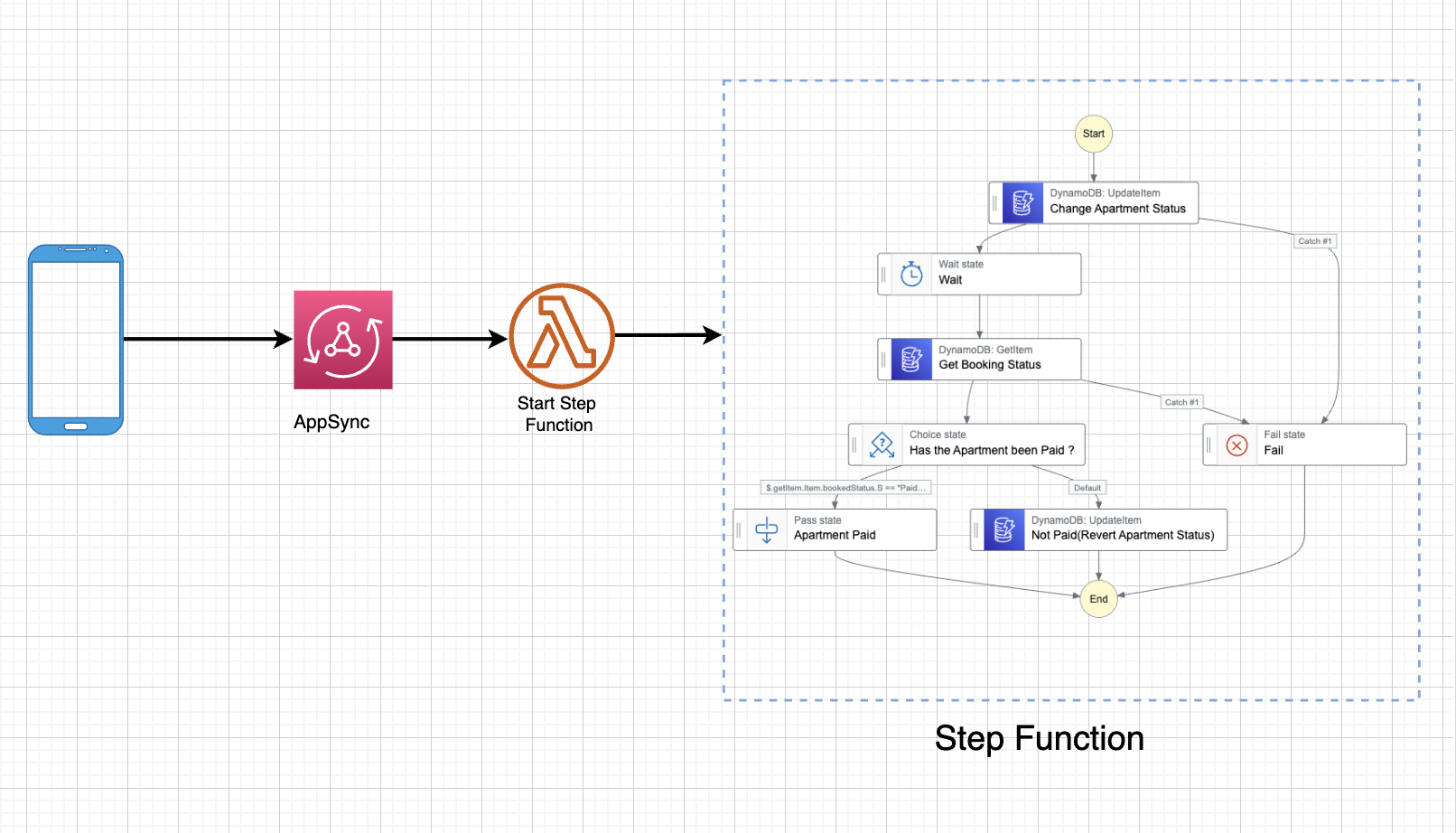
Because we’d love to invoke a step function workflow from a frontend application, we’ll use AppSync to create an endpoint which we’ll call from a mobile app created with AWS Amplify and Flutter.
But for this post, we’ll end at the point where we’ve created the AppSync endpoint.
Let’s get started.
Initialize CDK app
Firstly, create a new project directory. I’m using a Mac, so I’ll create mine and cd into it:
mkdir cdkApartmentWorkshop
cd cdkApartmentWorkshop
Create a CDK Python application in your newly created directory:
cdk init --language=python
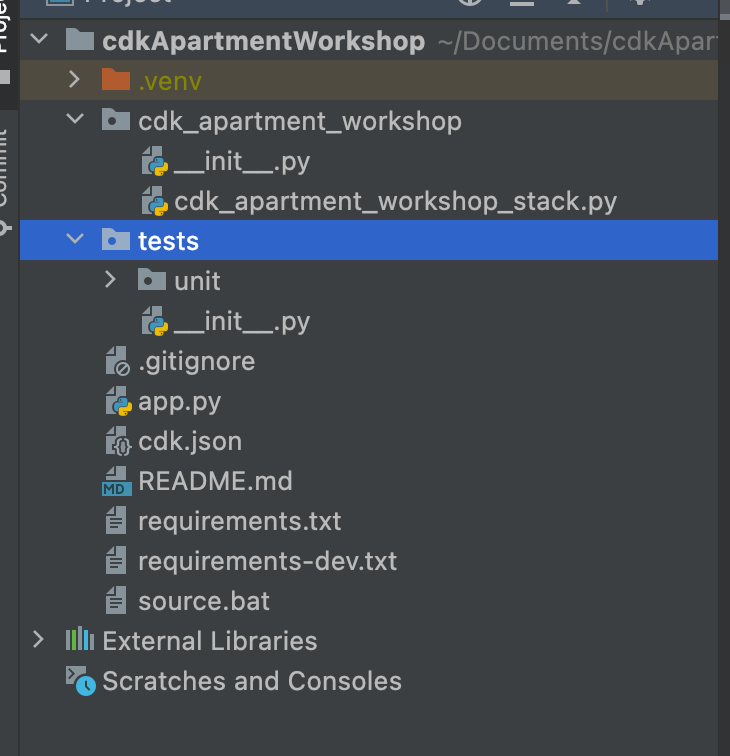
Once created, open up the newly created CDK app in your IDE. Here’s the project structure, and where we’ll be making the most changes in:
cdk_apartment_workshop_stack.py
After the init process completes and the virtualenv is created, you can use the following
step to activate your virtualenv:
source .venv/bin/activate
If you are using a Windows platform, you would activate the virtualenv like this:
.venv\Scripts\activate.bat
Once the virtualenv is activated, you can install the required dependencies. From the root directory of the project, install all dependencies in requirements.txt by running the command pip install -r requirements.txt
Next, open up [app.py](http://app.py) and add an accountId and region to your environment like so:
env=cdk.Environment(account="132260253285", region='us-east-2')
Here’s what my [app.py](http://app.py) looks like now:
app = cdk.App()
CdkApartmentWorkshopStack(app, "CdkApartmentWorkshopStack",
  env=cdk.Environment(account="1322xxxxxxx5", region='us-east-2'),
                          )

app.synth()
Create GraphQL Api
Our first step is creating a GraphQL API. For this tutorial, we’ll use an API_KEY for authentication.
Also, we want AppSync to output all request and response logs to CloudWatch for monitoring and debugging. So we’ll have to create a log role.
We have 2 constructs to import from aws-cdk:
- AppSync
aws_appsync as appsync - Role
aws_iam as role,
        general_role = role.Role(self, 'general_role',
                                 assumed_by=role.ServicePrincipal("appsync.amazonaws.com"))

        general_role \
            .add_managed_policy(role.ManagedPolicy
                                .from_aws_managed_policy_name("service-role/AWSAppSyncPushToCloudWatchLogs"))

        api = appsync.CfnGraphQLApi(
            self, "cdkMomoApi", name="cdkMomoApi",
            authentication_type='API_KEY',
            log_config=appsync.CfnGraphQLApi.LogConfigProperty(
                cloud_watch_logs_role_arn=general_role.role_arn,
                exclude_verbose_content=False,
                field_log_level='ALL'

            ),

            xray_enabled=True
         )
Add GraphQL Schema
In your stack directory, create a file called schema.txt and type in the following GraphQL schema.
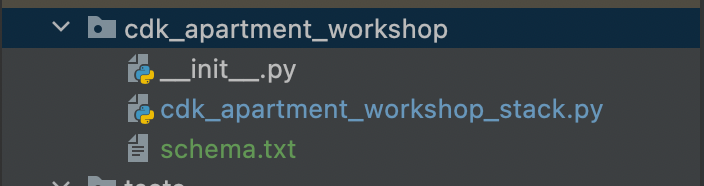
type stepfunctions {
  id: String!
  arn: String!
}
type Query {
  getStepFunctions: [ stepfunctions! ]
}
input StepFunctionsInput {
  id:ID!
  arn: String!
}
type Mutation {
  addStepFunction(input: StepFunctionsInput!): stepfunctions
}

schema {
  query: Query
  mutation: Mutation
}
The next step is to attach this schema to the GraphQL API. So we need to import it:
from os import path
dirname = path.dirname(__file__)
with open(path.join(dirname, "schema.txt"), 'r') as file:
    data_schema = file.read().replace('\n', '')
graphql_schema = appsync.CfnGraphQLSchema(self, "CdkApartmentGraphQLSchema",
                                          api_id=api.attr_api_id,

                                          definition=data_schema
                                          )
So the cdk_apartment_workshop_stack.py file looks like this now:
from os import path

from aws_cdk import (
    Stack,
    aws_appsync as appsync,

    aws_iam as role,

)
from constructs import Construct

dirname = path.dirname(__file__)
class CdkApartmentWorkshopStack(Stack):

    def __init__(self, scope: Construct, construct_id: str, **kwargs) -> None:
        super().__init__(scope, construct_id, **kwargs)

        with open(path.join(dirname, "schema.txt"), 'r') as file:
            data_schema = file.read().replace('\n', '')
        general_role = role.Role(self, 'dynamodbRole',
                                 assumed_by=role.ServicePrincipal("appsync.amazonaws.com"))

        general_role \
            .add_managed_policy(role.ManagedPolicy
                                .from_aws_managed_policy_name("service-role/AWSAppSyncPushToCloudWatchLogs"))

        api = appsync.CfnGraphQLApi(
            self, "cdkMomoApi", name="cdkMomoApi",
            authentication_type='API_KEY',
            log_config=appsync.CfnGraphQLApi.LogConfigProperty(
                cloud_watch_logs_role_arn=general_role.role_arn,
                exclude_verbose_content=False,
                field_log_level='ALL'

            ),

            xray_enabled=True
        )

        graphql_schema = appsync.CfnGraphQLSchema(self, "CdkMomoGraphQLSchema",
                                                  api_id=api.attr_api_id,

                                                  definition=data_schema
                                                  )
Adding A DynamoDB Table
We need to add a table to store all apartment info such as apartmentId , status etc.
The first step is to import the dynamoDb construct from aws_cdk:
aws_dynamodb as dynamodb,
cdk_apartment_table = dynamodb.Table(self, "CdkApartmentTable",
                                table_name="CdkApartmentTable",
                                partition_key=dynamodb.Attribute(
                                    name='Id',
                                    type=dynamodb.AttributeType.STRING,

                                ),

                              billing_mode=dynamodb.BillingMode.PAY_PER_REQUEST,

                                )
Take note of the table name and the primary key attribute.
Lambda , Lambda Datasource and AppSync Resolver
In our schema file schema.txt, we had a mutation like this as an endpoint:
addStepFunction(input: StepFunctionsInput!): stepfunctions
Accessing this endpoint invokes our step functions workflow.
In this tutorial, we’ll use a lambda function to express this endpoint. Remember that we could as well go for a vtl template with dynamodb as the data source.
Create Lambda Function
Create a folder in your stack called lambda and then, create a python file called start_step_function.py and type in the following code:
import json

def handler(event, context):
    print("Lambda function invoked")
    print(json.dumps(event))

    return {"id": event["arguments"]['input']['id'], "version": event["arguments"]['input']['arn']}
All this lambda does is, take in an input and return the same input as the output.
First, import a lambda construct from aws_cdk :
aws_lambda as lambda_
Now, let’s instantiate the lambda function inside our stack file:
lambda_function = lambda_.Function(
            self, "LambdaFunction",
            runtime=lambda_.Runtime.PYTHON_3_8,
            handler="start_step_function.handler",
            code=lambda_.Code.from_asset(path.join(dirname, "lambda")),
        )
In-order for AppSync to call lambda, we need to attach a policy to an AppSync role.
Remember that, above, we had already created a general_role.
Now let’s attach a lambda access managed policy to that role:
general_role.add_managed_policy(role.ManagedPolicy.from_aws_managed_policy_name("AWSLambda_FullAccess"))
The next step is to create a lambda data source that’ll be attached to an AppSync resolver:
cdk_apartment_data_source = appsync.CfnDataSource(self,
"CdkApartmentDatasource", api_id=api.attr_api_id,

name="CdkApartmentDataSource", type='AWS_LAMBDA',

lambda_config=appsync.CfnDataSource.LambdaConfigProperty(

lambda_function_arn=lambda_function.function_arn),
service_role_arn=general_role.role_arn)
Take note of the service_role_arn we’ve attached to the data source.
Now, let’s attach a resolver to the data source like so:
add_step_functions_resolver = appsync.CfnResolver(
    self,
    "addStepFunction",
    api_id=api.attr_api_id,
    type_name="Mutation",
    field_name="addStepFunction",
    data_source_name=cdk_apartment_data_source.attr_name

)
It’s actually connected to the mutation we created in the schema.txt file.
Therefore this resolver depends on the schema:
add_step_functions_resolver.add_depends_on(graphql_schema)
So far, we’ve created an AppSync API and connected a lambda function to it. We now have to create the step functions workflow and invoke that workflow from our lambda endpoint.
We already designed the workflow in the AWS step functions visual studio. Here’s the ASL(Amazon States Language) code:
{
  "Comment": "A description of my state machine",
  "StartAt": "Change Apartment Status",
  "States": {
    "Change Apartment Status": {
      "Type": "Task",
      "Resource": "arn:aws:states:::dynamodb:updateItem",
      "Parameters": {
        "TableName": "apartment_workshop_db",
        "Key": {
          "Id": {
            "S.$": "$.input.apartmentId"
          }
        },
        "UpdateExpression": "SET #apartmentStatus = :status",
        "ExpressionAttributeNames": {
          "#apartmentStatus": "status"
        },
        "ExpressionAttributeValues": {
          ":status": {
            "S.$": "$.input.status"
          }
        },
        "ConditionExpression": "attribute_exists(Id)"
      },
      "Catch": [
        {
          "ErrorEquals": [
            "States.TaskFailed"
          ],
          "Comment": "Apartment Doesn't Exist",
          "Next": "Fail",
          "ResultPath": "$.error"
        }
      ],
      "Next": "Wait",
      "ResultPath": "$.updateItem"
    },
    "Wait": {
      "Type": "Wait",
      "Seconds": 5,
      "Next": "Get Apartment Status"
    },
    "Get Apartment Status": {
      "Type": "Task",
      "Resource": "arn:aws:states:::dynamodb:getItem",
      "Parameters": {
        "TableName": "apartment_workshop_db",
        "Key": {
          "Id": {
            "S.$": "$.input.apartmentId"
          }
        }
      },
      "ResultPath": "$.getItem",
      "Next": "Has Client Made Payment ?"
    },
    "Has Client Made Payment ?": {
      "Type": "Choice",
      "Choices": [
        {
          "And": [
            {
              "Variable": "$.getItem.Item.status.S",
              "StringEquals": "paid"
            },
            {
              "Variable": "$.getItem.Item.Id.S",
              "StringEquals": "1234567"
            }
          ],
          "Next": "Payment Was made."
        }
      ],
      "Default": "Payment Wasn't Made, revert."
    },
    "Payment Was made.": {
      "Type": "Pass",
      "End": true
    },
    "Payment Wasn't Made, revert.": {
      "Type": "Task",
      "Resource": "arn:aws:states:::dynamodb:updateItem",
      "Parameters": {
        "TableName": "apartment_workshop_db",
        "Key": {
          "Id": {
            "S": "1234567"
          }
        },
        "UpdateExpression": "SET #apartmentStatus = :status",
        "ExpressionAttributeNames": {
          "#apartmentStatus": "status"
        },
        "ExpressionAttributeValues": {
          ":status": {
            "S": "vacant"
          }
        }
      },
      "End": true
    },
    "Fail": {
      "Type": "Fail",
      "Error": "Apartment Doesn't Exist",
      "Cause": "Update Condition Failed"
    }
  }
}
Now, we have to convert each step of our workflow from ASL to CDK. Let’s begin!
Change Apartment Status
The first step is the Change Apartment Status which is a DynamoDB UpdateTask Item.
Here’s it’s ASL:
 "Change Apartment Status": {
      "Type": "Task",
      "Resource": "arn:aws:states:::dynamodb:updateItem",
      "Parameters": {
        "TableName": "apartment_workshop_db",
        "Key": {
          "Id": {
            "S.$": "$.input.apartmentId"
          }
        },
        "UpdateExpression": "SET #apartmentStatus = :status",
        "ExpressionAttributeNames": {
          "#apartmentStatus": "status"
        },
        "ExpressionAttributeValues": {
          ":status": {
            "S.$": "$.input.status"
          }
        },
        "ConditionExpression": "attribute_exists(Id)"
      },
      "Catch": [
        {
          "ErrorEquals": [
            "States.TaskFailed"
          ],
          "Comment": "Apartment Doesn't Exist",
          "Next": "Fail",
          "ResultPath": "$.error"
        }
      ],
      "Next": "Wait",
      "ResultPath": "$.updateItem"
    },
Here is its CDK equivalent:
      # Define Step function tasks
        fail_step = sf.Fail(self, 'Fail', cause="Failed to Update Apartment Status", error="ConditionalFailedException")
        change_apartment_status = sf_tasks.DynamoUpdateItem(
            self, "Change Apartment Status",
            key={
                'id': sf_tasks.DynamoAttributeValue.from_string(sf.JsonPath.string_at("$.input.apartmentId")),

            },
            table=cdk_apartment_table,
            condition_expression="attribute_exists(Id)",
            update_expression="SET #apartmentStatus = :status",
            update_expression_names={
              "#apartmentStatus":"status"
               },
            expression_attribute_values={
                ":status": sf_tasks.DynamoAttributeValue.from_string(sf.JsonPath.string_at("$.input.status"))
            },
            result_path="$.updateItem",

        ).add_catch(handler=fail_step)
Wait
ASL
    "Wait": {
      "Type": "Wait",
      "Seconds": 5,
      "Next": "Get Apartment Status"
    },
CDK
wait_step = sf.Wait(self, 'Wait', time=sf.WaitTime.duration(Duration.seconds(30)))
Get Apartment Status
ASL
    "Get Apartment Status": {
      "Type": "Task",
      "Resource": "arn:aws:states:::dynamodb:getItem",
      "Parameters": {
        "TableName": "apartment_workshop_db",
        "Key": {
          "Id": {
            "S.$": "$.input.apartmentId"
          }
        }
      },
      "ResultPath": "$.getItem",
      "Next": "Has Client Made Payment ?"
    },
CDK
a
Not Paid (Revert Apartment Status)
ASL
    "Payment Wasn't Made, revert.": {
      "Type": "Task",
      "Resource": "arn:aws:states:::dynamodb:updateItem",
      "Parameters": {
        "TableName": "apartment_workshop_db",
        "Key": {
          "Id": {
            "S": "1234567"
          }
        },
        "UpdateExpression": "SET #apartmentStatus = :status",
        "ExpressionAttributeNames": {
          "#apartmentStatus": "status"
        },
        "ExpressionAttributeValues": {
          ":status": {
            "S": "vacant"
          }
        }
      },
      "End": true
    },
CDK
apartment_not_paid = sf_tasks.DynamoUpdateItem(
            self, "Payment Wasn't Made, revert.",
            key={
                'id': sf_tasks.DynamoAttributeValue.from_string(sf.JsonPath.string_at("$.getItem.Item.id.S")),

            },
            table=cdk_momo_table,
            condition_expression="attribute_exists(Id)",
            update_expression="SET #apartmentStatus = :status",
            update_expression_names={
              "#apartmentStatus":"status"
               },
            expression_attribute_values={
                ":status": sf_tasks.DynamoAttributeValue.from_string('vacant')
            },
            result_path="$.notPaid",

        )
Payment Was Made
ASL
 "Payment Was made.": {
      "Type": "Pass",
      "End": true
    },
CDK
apartment_paid = sf.Pass(self, 'Apartment Paid', comment="Apartment Paid")
Has Client Made Payment?
ASL
 "Has Client Made Payment ?": {
      "Type": "Choice",
      "Choices": [
        {
          "And": [
            {
              "Variable": "$.getItem.Item.status.S",
              "StringEquals": "paid"
            },
            {
              "Variable": "$.getItem.Item.Id.S",
              "StringEquals": "1234567"
            }
          ],
          "Next": "Payment Was made."
        }
      ],
      "Default": "Payment Wasn't Made, revert."
    },
CDK
 = sf.Choice(self, "Has the Apartment been Paid ?", comment="Has the Apartment been Paid ?")
                  .when(sf.Condition.string_equals(sf.JsonPath.string_at("$.getItem.Item.id.S"), '1234567') and
                        sf.Condition.string_equals(sf.JsonPath.string_at("$.getItem.Item.status.S"), 'Paid'),
                        apartment_paid
                        )
                  .otherwise(apartment_not_paid)
The final step is to chain the states together and then instantiate our step functions workflow:
definition = change_apartment_status.next(wait_step) \
            .next(get_status) \
            .next(has_client_made_payment)
Instantiate Step functions workflow and grant_start_execution permissions to lambda function:
step = sf.StateMachine(self, 'CdkApartmentStateMachine',

                               definition=definition,

                               state_machine_name="CdkApartmentStateMachine",
                               state_machine_type=sf.StateMachineType.STANDARD
                               )
Grant Permissions to lambda function:
cdk_momo_table.grant_full_access(lambda_function)
All OutPuts for our program:
CfnOutput(self, "LambdaFunctionName",
                  value=lambda_function.function_name,
                  export_name='FunctionName',
                  description='Function name')
        CfnOutput(self, "AppSync Url",
                  value=api.attr_graph_ql_url,
                  export_name='AppsyncUrl',
                  description='AppsyncUrl')

        CfnOutput(self, "database arn",
                  value=cdk_apartment_table.table_arn,
                  export_name='DynamoDbArn',
                  description='DynamoDBArn')

        CfnOutput(self, "step functions arn",
                  value=step.state_machine_arn,
                  export_name='StepFunctionArn',
                  description='StepFunctionArn')
Invoke Step functions from lambda:
import json
import boto3

step_function_client = boto3.client("stepfunctions")

def handler(event, context):
    print("Lambda function invoked")
    print(json.dumps(event))
    print(json.dumps(event["arguments"]['input']))

    response = step_function_client.start_execution(
        stateMachineArn=event["arguments"]['input']['version'],
        name=event["arguments"]['input']['id'],
        input="{\"input\":{\"apartmentId\":\"1234567\",\"status\":\"vacant\"}}",

    )

    return {"id": event["arguments"]['input']['id'], "version": event["arguments"]['input']['version']}
We import the stepfunctions class from boto3 client and use it to start a step functions execution by passing in the StateMachineArn we get from deploying the project, a unique name for the state machine execution and the state machine input.
Here’s a link to the complete project
- https://github.com/trey-rosius/cdk_stepfunctions
Run it and deploy it
cdk synth
cdk bootstrap
cdk deploy
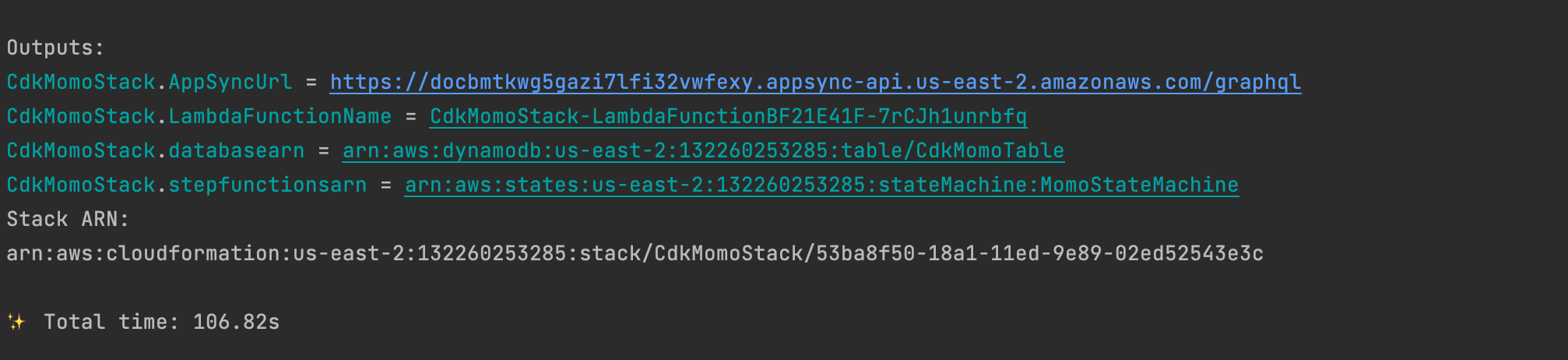
Once you deploy your app, be sure to copy the step functions arn output from the command line interface.
We’ll be using it to test the workflow from AppSync.
Here’s the output from my deploy:

Testing
Log into your AWS Console and search for AppSync in the search box
Click on AWS AppSync under services and open up your AppSync project.
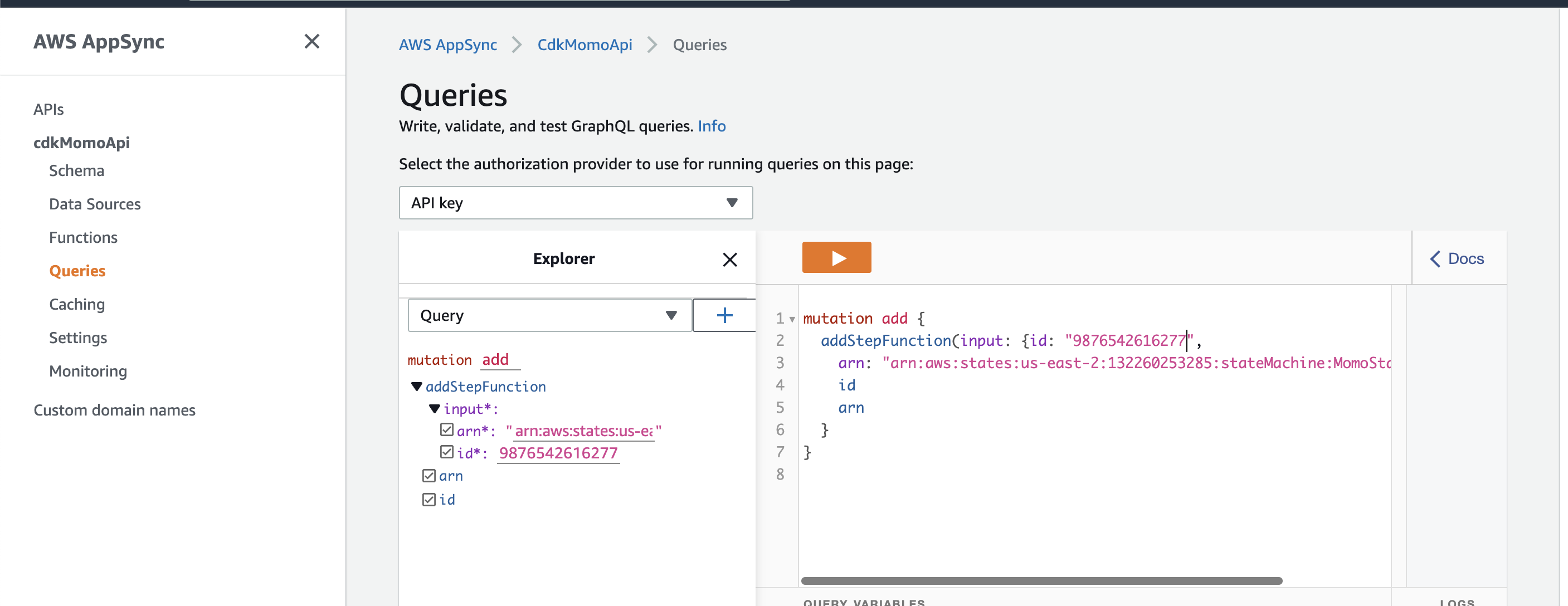
Click on Queries on the left-hand side menu, enter a unique Id and the step functions arn you copied above, and hit the orange button above.
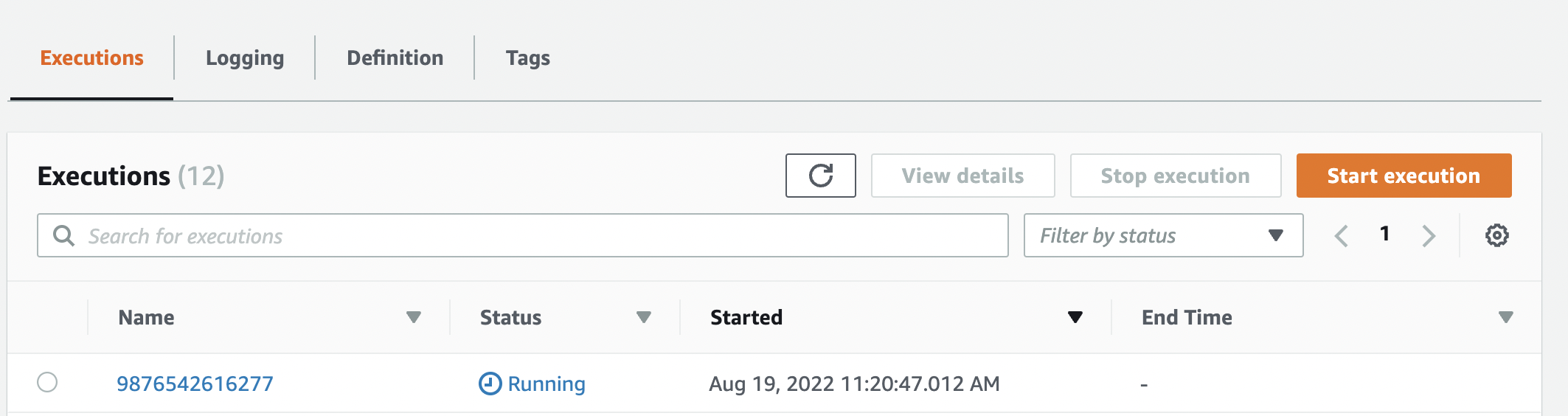
Go to Step functions in your AWS Console and see the execution running:
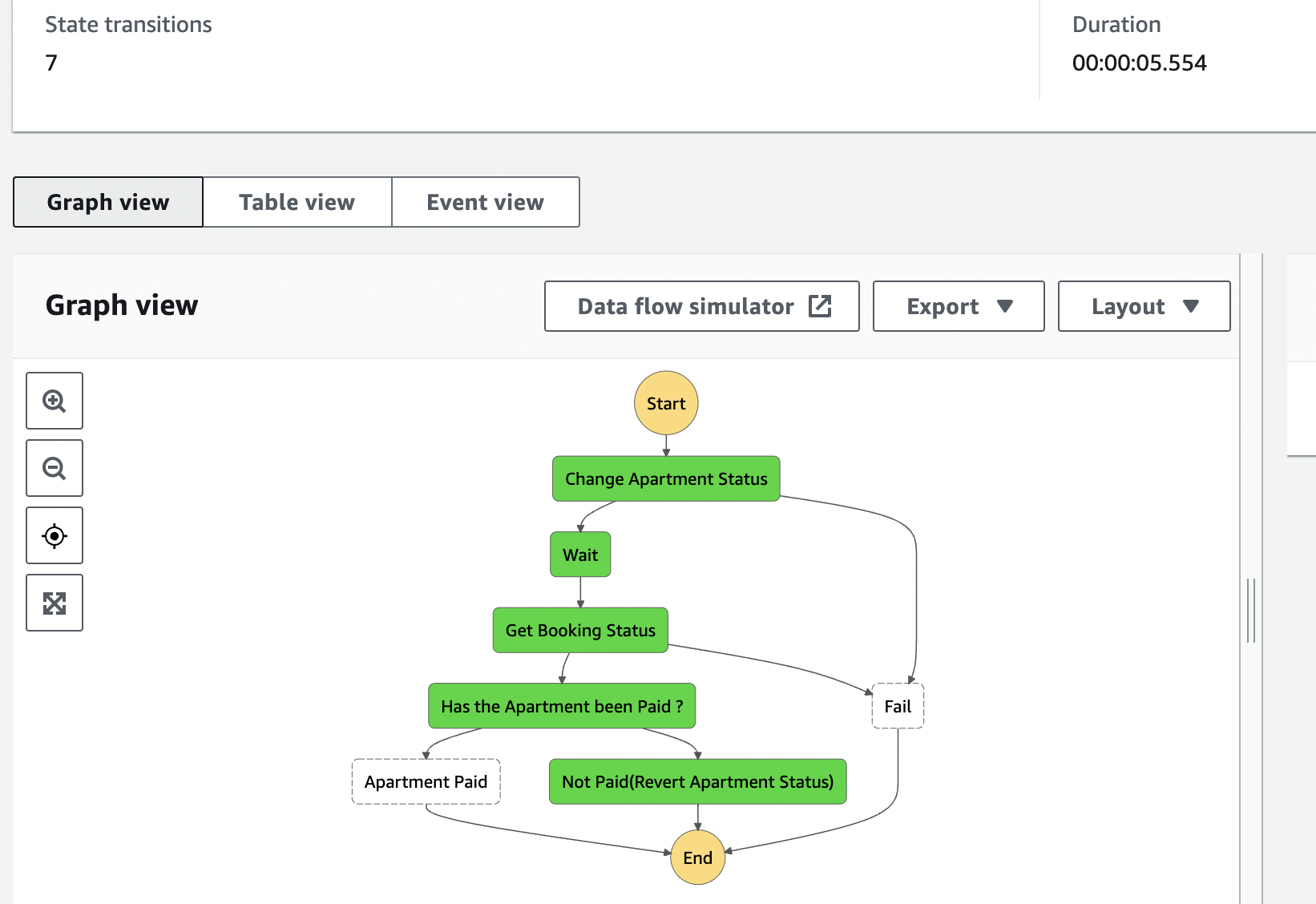
Click on the running step functions and see the workflow.
Conclusion
In this post, we built a step functions workflow using CDK as IaC, AppSync, and Python. This workflow mimics a real-life scenario of booking/reserving an apartment.
- We saw how to invoke a Step functions workflow from a lambda function through an endpoint.
- We saw how to convert a step functions ASL(Amazon states language) to CDK infrastructure as code(IaC)
- We saw how to use IaC to create Applications with Step functions.
Major Advantages of Using IaC.
- Starting up and safely tearing down your application when configuration changes can be done in a matter of minutes.
- Instead of provisioning the resources of your application manually using the cloud console, IaC provides a single file that contains the entire infrastructure of your application, and you can deploy it.
- IaC enables you to deploy a consistent configuration to multiple environments (dev, stage, prod).
- Easily Version your infrastructure.
In the next post, we’ll see how to build this same workflow using an IaC(Infrastructure as Code) framework such as SAM(Serverless Application Model), with Python and AppSync.
Stay tuned
About the author
I love creating and writing about the creation of software.
Comments
Join the discussionNo comments yet. Be the first to comment.
AWS STEP FUNCTIONS
This series gives a broad overview on AWS Step functions and why it's considered one of the best AWS Services out there.


